by Michael Frye | Apr 25, 2018 | Digital Darkroom
In my last post I cautioned about updating to Version 7.3 of Lightroom Classic CC (released in early April), as many people were experiencing problems. Yesterday Adobe released an update (v. 7.3.1) to address those issues. Here’s a link to the release notes.
From what I can gather so far, this latest update seems to be working, and people are reporting that most of the problems have been fixed. That means presets are now ordered and sorted correctly, and, for the most part, profiles are no longer being inadvertently changed when applying presets. (Profiles are still sometimes getting changed when I apply a B&W Mix preset to an image. This may not be a bug, however, but an inherent problem with the new implementation of profiles.) And most of the crashes and other performance issues people experienced should be fixed.
(more…)
by Michael Frye | Apr 23, 2018 | Digital Darkroom
Earlier this month Adobe released an update to Lightroom Classic CC (v. 7.3). If you haven’t already installed this update I would wait, as many people are experiencing problems. It’s not unusual for a software update to have some issues, but this release has more problems than usual.
Most of the issues relate to presets, so if you never use presets you’ll probably be fine. If you use presets I would definitely wait until the next update. If you’ve already updated and are experiencing problems, it’s actually pretty easy to revert to the previous version (7.2) of Lightroom Classic.
(more…)
by Michael Frye | Oct 26, 2017 | Digital Darkroom
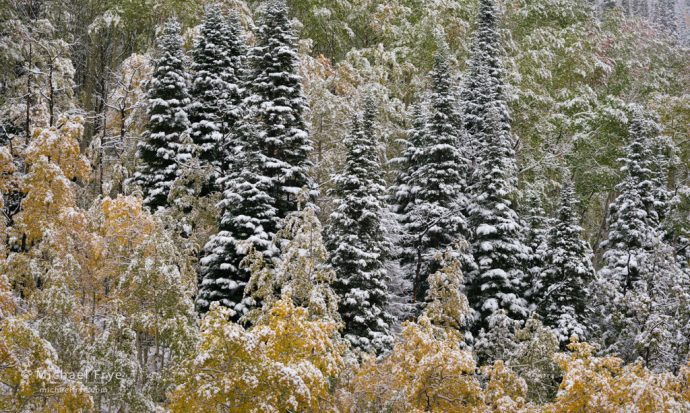
I used the new Range Mask tool in Lightroom Classic CC to improve the green colors in this photo from Rabbit Ears Pass in Colorado
Adobe announced two new, different versions of Lightroom last week. And, unfortunately, the names have created a lot of confusion. Here are the essential things you need to know:
No More Perpetual License
Adobe will no longer make new standalone versions of Lightroom with a perpetual license. That means new versions of Lightroom will be available by subscription only. Lightroom 6 is the last non-subscription version that you can purchase outright. Lightroom 6 is still available for now, but won’t be updated to support new cameras. (You can still use Adobe’s free DNG converter to convert Raw images from new cameras into the DNG format, then import those DNG files into Lightroom 6.)
New Lightroom Classic CC
The new version of the program we’re familiar with is called Lightroom Classic CC. This is the traditional, folder-based version of Lightroom. It is essentially the same as Lightroom CC 2015, but with performance improvements and a new Range Mask tool that allows you to make more precise selections with the Adjustment Brush, Graduated Filter, and Radial Filter.
(more…)
by Michael Frye | Nov 13, 2015 | Announcements, Digital Darkroom
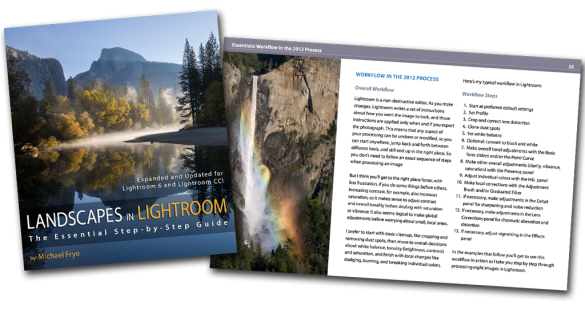
A quick reminder that the price for my Landscapes in Lightroom ebook and video package will go up on Sunday (at midnight Pacific time) from $14.95 to $27.00. This is your last chance to get the new edition at the old price! The new version has been updated for Lightroom 6 and Lightroom CC, and includes eight step-by-step examples, plus ten video tutorials. Click the Add to Cart button below, or visit this page for more information.
Landscapes in Lightroom: The Essential Step-by-Step Guide
PDF ebook plus video tutorials
103 double-page spreads
14.95 until Sunday, November 15th, after which the price goes up to 27.00
FAQ
Purchase from the Eduction Center
(more…)
by Michael Frye | Oct 7, 2015 | Announcements, Digital Darkroom
Landscapes in Lightroom: The Essential Step-by-Step Guide
PDF ebook with video tutorials
103 double-page spreads
14.95 for a limited time, after which it goes up to 27.00
FAQ


Here it is! The latest update to my ebook, Landscapes in Lightroom: The Essential Step-by-Step Guide, is now available. This new edition is revised and updated for Lightroom 6 and Lightroom CC, and includes two new examples and videos demonstrating how to use the most significant new features – the HDR Merge and the Panorama Merge.
Of course this new version still has all the features that made the first edition so popular. First, you can download the original Raw files used as examples in the ebook, and then follow along with each step yourself – just as if you were attending one of my workshops.
Second, when you purchase the ebook you get exclusive access to ten videos demonstrating different aspects of Lightroom’s Develop Module, like using the Adjustment Brush, Spot Removal Tool, and Point Curve, advanced retouching in Lightroom, the new HDR Merge, and much more. It’s great to read about a tool or technique; it’s even better to watch a demonstration, and then try it yourself on the same image.
And third, there’s the PDF ebook itself. This includes eight examples, where I take you step-by-step through processing each image in Lightroom. You’ll get to see my workflow in action, with a variety of images – high contrast, low contrast, color, black and white, HDR merge, and panorama. You’ll learn many specific techniques and tips, but perhaps more importantly, you’ll gain insight into the decision-making process that so many photographers struggle with. How much contrast is enough? How far can you push the saturation without making the image look garish or fake? What’s the right white balance?
(more…)