In the Moment:
Michael Frye's Landscape Photography Blog
by Michael Frye | Apr 14, 2010 | Critiques
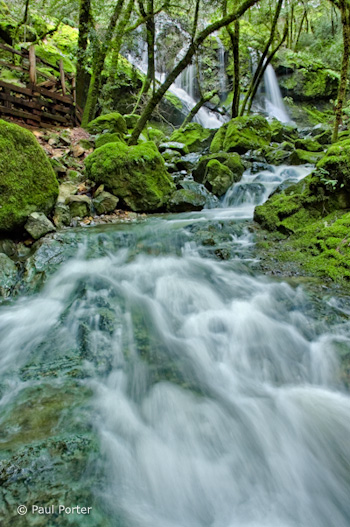
Cataract Catwalk” by Paul Porter
This week’s photograph was made by Paul Porter at Mount Tamalpais State Park, north of San Francisco. While last week’s image was a model of simplicity, this scene is much more complex, with cascades, rocks, trees, and the boardwalk railing. I think Paul did a great job of integrating all those elements together and creating a strong composition.
The foreground water is the dominant feature—it fills up almost half the frame. The converging lines of the stream point toward the waterfall at the top, leading our eyes there and creating a nice near-far juxtaposition. That prominent foreground and it’s leading lines hold all the complex elements of the scene together and make a coherent statement out of what could have been a visual mess.
The walkway railing is a man-made object in an otherwise natural scene, and it’s color, lines, and shapes are different from everything else in the frame. Yet despite all that it’s fairly unobtrusive, and you could even make an argument that it adds interest and a human element, allowing viewers to imagine that they could be part of this scene.
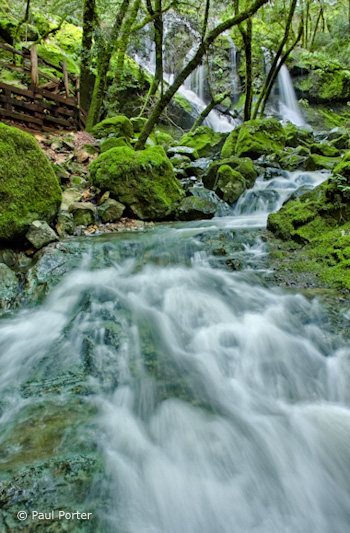
One thing that does bother me slightly is the tree trunk in the upper-right corner. Any object that lives on the edge like this can be distracting, and it’s worse if it’s partially cut off—that is, not completely in the photograph or out of it. In this case it’s easy to crop a bit off the right side and eliminate it, and I’ve uploaded another version to show what that looks like. I also trimmed a little off the bottom as well, as after cropping the right edge the bottom of the image seemed a bit too elongated.
Right and bottom edges trimmed
The focal length was 18mm on an APS-size sensor (equivalent to about 28mm on a full-frame sensor). Since wide-angle lenses like this include so much of the scene, it’s easy to allow extraneous elements to creep in and clutter up the image, and it can be challenging to keep the compositions simple. But the strength of short focal lengths is creating the kind of near-far juxtaposition that we see here. Wide-angle lenses make distant objects seem smaller, thereby exaggerating the apparent size difference between near and far, and creating an illusion of depth.
There are two keys to creating that sense of depth with a wide-angle lens. First, you have to put the camera close to something in the foreground—usually no more than five feet away—otherwise everything will look small and distant. Second, you need to keep everything in focus. Paul did both of those things here: the foreground rocks and water appear to be less than three feet from the camera, and everything looks sharp, at least in this small enlargement. Even though this image isn’t the kind of sweeping grand landscape we usually associate with that near-far juxtaposition, there’s a palpable sense of depth and distance between the rocks and water at the bottom of the frame and the trees and fall near the top. You almost feel as though you could walk—or rather wade—into this scene.
Telephoto lenses do the opposite—they compress space and make objects look closer together than they really are. This is great for creating patterns, as you can bring similar lines and shapes into close visual proximity even when they’re physically far apart. From this spot, for example, you could use a longer focal length to zoom in on the trees and waterfall and the top of the frame, working with the patterns created by the trunks and strands of water.
The soft, overcast light was a perfect complement to this scene. Sunlight would have been a contrasty nightmare. Aside from creating severe exposure problems, splotchy highlights and shadows would have added complexity and confusion. Even with the overcast conditions Paul said that he needed to blend two exposures together in Photoshop, since the upper falls were quite a bit brighter than the shadier foreground. This post-processing looks very well done. The merge is seamless—you’d never know that two images had been combined. (I discuss exposure blending in my Digital Zone System article for Outdoor Photographer, and in more detail in my Digital Landscape Photography book.)
The overall contrast and saturation look great. In fact Paul said that he reduced the saturation in some areas after some of the adjustments he made “created a little undesired over-saturation.” The only thing I could quibble with about the processing is the white balance, which to me looks a little blue. This is especially noticeable in the water. To correct this, I used the eyedropper tool in Lightroom and clicked on the water to make it neutral. This worked well for the water, but made the greens a bit too yellow for my taste, so I tweaked the greens to push them closer to their original color. Here are both of these versions for comparison.
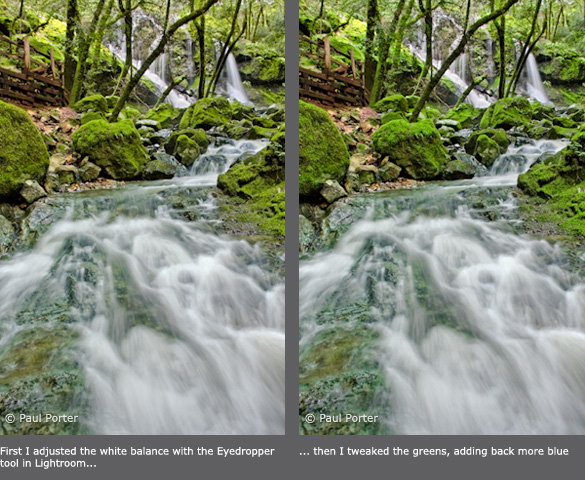
Paul used a shutter speed of 1/2 second for both exposures. This looks about right—slow enough to give the water that silky, flowing look, yet fast enough to prevent the water from losing all texture. There’s a nice contrast between the smooth water and the rough textures of the mossy trees and rocks.
Overall this is very well done—nicely composed, technically well-executed, and skillfully processed.
Thanks Paul for sharing your image! You can see more of his work on Flickr.
If you’d like your images considered for future critiques, just upload them to the Flickr group I created for this purpose. If you’re not a Flickr member yet, joining is free and easy. You’ll have to read and accept the rules for the group before adding images, and please, no more than five photos per person per week. I’ll be posting the next critique on April 20th or 21st. Thanks for participating!
by Michael Frye | Apr 7, 2010 | Critiques
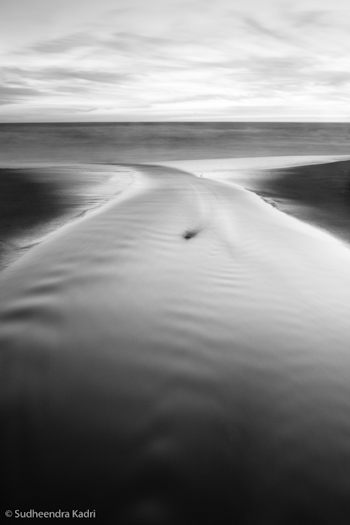
“Outward Momentum, Panther Beach, Davenport, California” by Sudheendra Kadri
This week’s image, by Sudheendra Kadri, was made at Panther Beach in Davenport, California (just north of Santa Cruz).
What initially caught my eye was this photograph’s zen-like simplicity. The entire image consists of only a few lines and shapes. The dominant visual element is the curving X of the stream, resembling a whale’s tail, which in turn is flanked by two triangles of darker sand, then topped by a band of water and lighter expanse of sky. The small dark rock in the center of the frame could be a distraction under different circumstances, but here I think it’s a nice touch, adding a subtle focal point.
In photography, less is usually more, and this image provides a great example of that. The simple, graphic design grabs our attention in a way that more cluttered compositions don’t. But simplicity isn’t simple—in fact it’s quite difficult. The universe wasn’t constructed with photographers in mind; much of the time the world seems to consist of random clutter, with bits of junk and debris thrown in for good measure. The photographer’s job is to find order within that chaos (to paraphrase Robert Glenn Ketchum), to see designs and patterns in the random configurations of the universe.
I talked about seeing abstractly—focusing on lines, shapes, and patterns, rather than thinking about the subject—in my critique from March 24th. I also discuss this in my Digital Landscape Photographybook, and in every workshop I teach. I must think it’s important! Sudheendra said on Flickr, “The way this stream turned sharply before meeting the oncoming waves caught my eyes and I thought this would bring some nice curves and lines into this frame.” So clearly he was thinking abstractly, and that mindset allowed him to see the potential of this scene.
This image’s simple design could only have been created from a particular point of view, which looks like it was the middle of the creek! I asked Sudheendra about that and he confirmed that, yes, he was standing in the water. I guess photographers sometimes have to sacrifice for their art.
The dusk light allowed a 30-second exposure that smoothed the foreground water, giving it that porcelain glow and increasing the level of abstraction by lessening the water’s texture. That soft, glowing, dusky light can be effective for many subjects; the great John Sexton seems to use it almost exclusively.
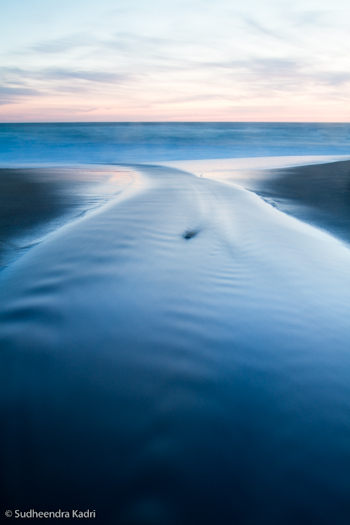
Sudheendra wrote on Flickr, “Shot after sundown, initially I liked the blue-hour colors, but once I saw how it looked in black and white, I wanted to stick with it.” I think that was a key decision, and a good one. Here you can see the color version that Sudheendra sent me for comparison (I added a little contrast to the file to make it closer to the black-and-white version). While the blues and pinks have some appeal, to me the black-and-white image is stronger. By taking away the color the image becomes that much more abstract, focusing our attention on just the lines and shapes, and emphasizing the strong design. We also notice the glassy texture of the foreground water more.
Even if you intend to make the final image black and white it’s usually better to capture the image in full color, as this gives you more options for making that conversion and translating the colors into shades of gray. (With Raw files that’s the only choice—they’re always in color—but some cameras can process JPEGs into black and white.)
Starting with that color image you can use the “Grayscale Mix” in Lightroom or Adobe Camera Raw, or a black-and-white adjustment layer in Photoshop, to alter the tonal relationships between different colors. A classic example is a red apple next to a green apple. A straight black-and-white conversion would make both apples appear medium gray. By adjusting the Grayscale Mix you can make the red apple lighter and the green apple darker, or vice versa. In this “Outward Momentum” photograph, lightening blues would make the foreground water a lighter shade of gray, while darkening magentas would lower the tones of the sky near the horizon. (I discuss these concepts in more detail in my Digital Landscape Photography book.)
But before making these adjustments you have to decide when to convert an image to black and white, and when to leave it in color. Any photograph that lacks color to begin with—a snow scene, or gray tree trunks against gray rocks—is a good candidate for black and white. But other situations are less obvious. To me the question to ask is whether color is adding to photograph’s message and mood, or distracting from it.
In Sudheendra’s photograph, although the original colors are interesting, it turns out that they actually take attention away from the strong, abstract design, which is really the point of the image. As a contrary example, my photograph from Tunnel View that I posted on this blog on February 9th, isn’t particularly colorful, so I tried it in black and white, but decided that the subtle colors, particularly the gold hues in the clouds, actually enhanced the mood, so I kept it in color.
Overall Sudheendra’s photograph is very well done. The only improvement I can think of is to darken the sky a bit, especially near the top, as it’s a bit bright and tends to pull the viewer’s eye out of the frame. But that’s a small thing.
Thanks Sudheendra for sharing your image! You can see more of his work on Flickr.
by Michael Frye | Feb 24, 2010 | Critiques
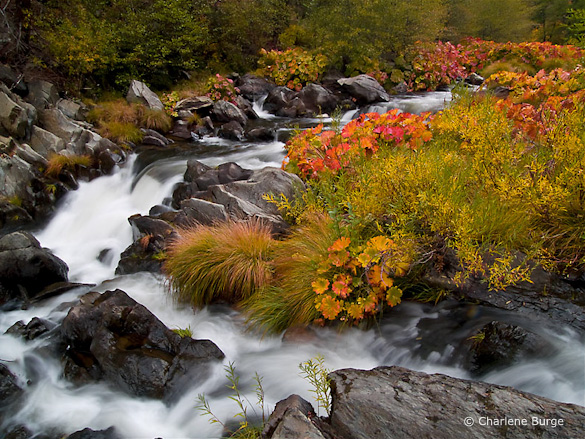
“A Walk Along the Cascades” by Charlene Burge
This week’s photograph, by Charlene Burge, is from the Plumas National Forest near the northern end of my home mountain range, the Sierra Nevada. The colorful plants along the creek are called wild rhubarb or Indian rhubarb. They’re found in a few places in and around Yosemite, but I was pleasantly surprised to discover this photo and see that they grow further north as well. It’s hard to tell from this image, but their leaves are quite large, sometimes more than a foot in diameter. Since they’re colorful in the fall, and grow along creeks, these plants make great photo subjects.
Color is one of the most appealing things about this image. The reds and oranges of the rhubarb draw the eye and contrast with the greens of the grasses and trees. The soft light of an overcast day worked perfectly for this subject. Sunlight would have been too harsh, creating bright highlights and dark shadows that would have overwhelmed the colors.
This seems counterintuitive to many beginning photographers—they assume that sunlight is a requirement for good photos, and that overcast is inherently dull. And that’s true for many subjects—the gray granite of El Capitan, for instance, seems lifeless on a cloudy day. But colorful subjects often look best with soft light. The even illumination gives prominence to color contrast rather than light-and-dark contrast.
While we’re on the subject of color, the white balance looks good here—the rocks and white water appear neutral, and everything else is the appropriate hue, except perhaps the greens, which look a bit too red to me. Usually I see the opposite problem—greens that look blue-green. Here the greens are too warm, so they blend with the surrounding golds and oranges, and some of the natural warm-cool color contrast has been lost. I used Lightroom to remove some of that reddish tint in this next version. The difference is subtle, and takes a good monitor to see, but to me it’s significant.
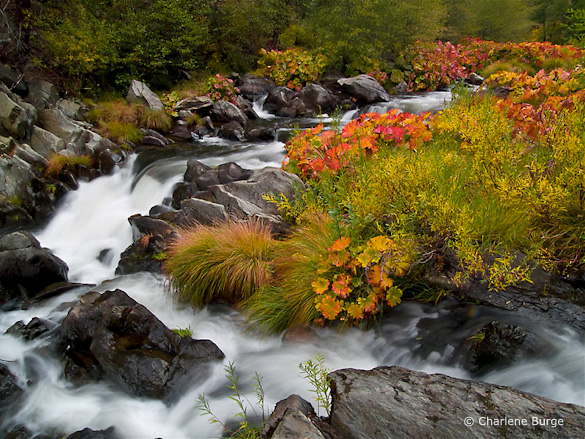
With the greens adjusted to remove the reddish tint
This image was captured at f/22 with a 1/2 second shutter speed. These were appropriate choices for showing the movement of the water and getting enough depth of field to keep everything in focus. The blurred, silky look of the water creates a nice textural contrast with the rocks and vegetation. The largest cascade, however, near the middle of the frame along the left side, lacks definition—it’s mostly the same shade of white. I might have tried a slightly faster shutter speed, like 1/4 sec. or 1/8 sec., to try to keep more texture in that area without losing the flowing appearance of the water. Of course that would have required opening the aperture to f/16 or f/11, creating possible depth of field problems, or using a higher ISO, which would have added noise. In photography, everything is a compromise.
The two branches of the creek form a nice semi-circular shape and give the image structure. The top and right edges of the frame seem well placed. The lower-left corner, however, is troublesome. Bright areas along the edge of a photograph are often distracting, and here the white water in the lower-left corner pulls my eye out of the frame and away from the main centers of interest.
But having identified this problem, there may not have been a solution. Charlene told me that she couldn’t include anything to the left because she couldn’t hang out further over the water. I’m guessing that intervening vegetation blocked the view. Even if she could have pointed the camera down and to the left more, the creek obviously continues in that direction, and white water would have touched the edge of the frame somewhere. In those situations I try to put dark rocks along as much of the edge as possible, but sometimes there’s no perfect solution.
These dilemmas are common in landscape photography. A subject catches your eye, yet somehow it defies your attempts to make a clean composition. Some annoying, distracting element can’t be eliminated without losing an essential component of the scene.
Most of my best photographs have practically composed themselves; the right framing was immediately obvious. When I struggle with the composition I rarely like the end result. But there are exceptions, situations where I’ve worked with a subject for half an hour and finally found a good solution. And even if it doesn’t work I often learn something in the process. So it’s worth the effort, even if resulting image isn’t successful.
In researching my most recent book I found this quote from Ansel Adams: “I have found that when I have to labor over a composition I seldom achieve anything worthwhile.” So even the great Adams faced the same problem!
With the composition we see here, the only thing that might help prevent the eye from leaking out of that lower-left corner is to darken the water a bit, and I’ve done that in this next version. For good measure I also darkened and added contrast to that cascade near the middle-left edge to try to bring out more texture. I can’t say these changes made a big difference, but every little bit helps.
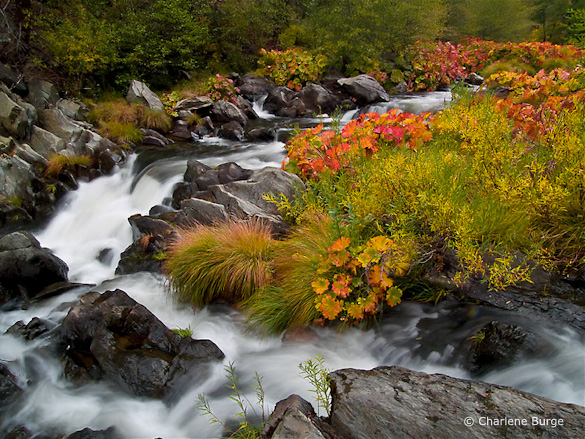
Water along the left side darkened, plus more contrast added to the large cascade
Despite my nitpicks this is a pleasing photograph of an intimate landscape. It makes me wish I had been there.
Thank you Charlene for sharing your image! You can see more of her work on Flickr.
If you’d like your images considered for future critiques, just upload them to the Flickr group I created for this purpose. If you’re not a Flickr member yet, joining is free and easy. You’ll have to read and accept the rules for the group before adding images, and please, no more than five photos per person per week. I’ll post the next critique on March 2nd or 3rd. Thanks for participating!
by Michael Frye | Feb 17, 2010 | Critiques
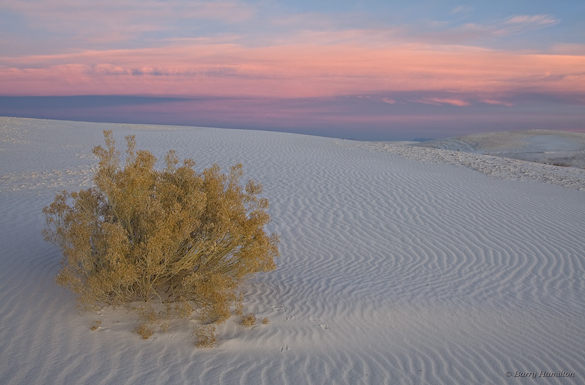
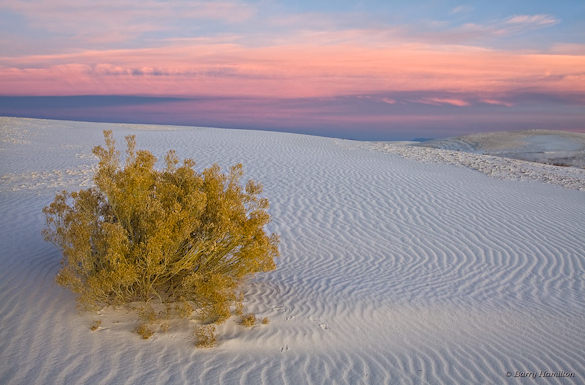
“Scrub, Before the Dawn” by Barry Hamilton
This week’s photo, by Barry Hamilton, is from White Sands National Monument, New Mexico. It features a simple, strong composition, with a clear focal point—the bush. That bush is too near the left edge of the photograph to qualify for the rule of thirds, but I think it works because it’s balanced by the ripples in the dune and the pink clouds. Yet another successful violation of the rule of thirds!
The pre-dawn glow is beautiful. Even though the sun wasn’t up yet, the light has a strong direction from the right, bringing out the texture of the dune. (Soft light with direction is one the subtleties I talk about in this article from Outdoor Photographer.) The pinks, golds, and blues form a pleasing color palette. Viewed larger you can see some nice details, like the animal tracks in the sand.
Barry says he found this shrub while scouting the day before. In my critique from two weeks ago I talked about the importance of flexibility, of adapting to conditions when the light and weather don’t meet your expectations. But that doesn’t mean you shouldn’t plan; planning and scouting are still vital components of landscape photography. The more intimately you know a location, the better your photographs will be. When traveling I’d rather spend two weeks in one area, getting to know the best viewpoints and understanding how the light changes, than spend two days apiece in seven different spots.
Technically this photograph is well executed. The contrast in this scene was low, so that made the exposure easy. There’s a lot of depth—the bush was only a few feet away from the camera—but everything appears to be in focus. That seems surprising, since the aperture was only f/9, but Barry told me that he took three frames, each focused at different distances, and blended them together in Photoshop to get the necessary depth of field.
This is a technique I use fairly often when I can’t get everything in focus with my smallest aperture. But with a wide-angle lens like this (28mm), properly focused, it should have been relatively easy to get enough depth of field at a small aperture like f/22. I can only guess that Barry was concerned that his lens wouldn’t be sharp at its smallest opening. Small apertures can cause diffraction, and a theoretical softening of the image. But I don’t believe theories unless I’ve tested them myself. I haven’t used Barry’s lens, a Canon 24-105mm f/4L, but with my 17-40 f/4L and 70-200 f/4L lenses I’ve found that while the center is sharper at middle apertures like f/8 and f/11—which fits with the theory—the corners are much crisper at f/22. So I’d rather sacrifice a little bit of sharpness in the center to gain a lot at the edges. Portrait photographers may not care about corner detail, but landscape photographers should. It’s important to test your equipment under conditions that are typical for you and the type of images you make.
One thing that struck me immediately about this photograph is that it looks flat—that is, lacking in contrast, especially in the foreground. Raw files often seem rather dull at first. (This is an issue I address in my Zone System article for Outdoor Photographer.) Here’s another version where I increased the contrast and lightened the foreground. The added contrast incidentally boosted the saturation as well.
Modified version with the contrast increased and foreground lightened
I also warmed up the color balance slightly, but not enough to eliminate the blue tint in the shadowed sides of the ripples. Part of what makes this image effective is the color contrast between the warm yellowish tint of the bush and the cooler blues in the dune, and I didn’t want to lose that by completely neutralizing the tones of the sand. A neutral color balance is not always as expressive as one with a subtle tint.
Digital imaging has given us tremendous power and flexibility in processing our images and changing their appearance. Most people, if they set their minds to it, can learn the tools of Photoshop, Lightroom, Nikon Capture, or whatever software they prefer. I think it’s more difficult to know what to do with those tools—to find the right color balance, or know when you’ve added enough contrast, but not too much. Of course these things are subjective; there are no right or wrong answers. But I think it helps to gain a frame of reference by spending time in galleries and museums. Look at the contrast in prints by Edward Weston and Ansel Adams, or the treatment of color balance and saturation by a modern color darkroom master like Christopher Burkett.
Thanks Barry for sharing your photograph! You can view more of Barry’s work on Flickr.
If you’d like your images considered for future critiques, just upload them to the Flickr group I created for this purpose. If you’re not a Flickr member yet, joining is free and easy. You’ll have to read and accept the rules for the group before adding images, and please, no more than five photos per person per week. I’ll post the next critique on February 23rd or 24th. Thanks for participating!
by Michael Frye | Feb 3, 2010 | Critiques
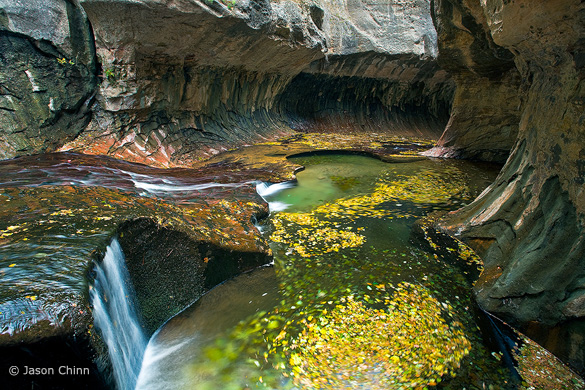
“Subway 1” by Jason Chinn, original version
Thanks to all of you who continue to submit photographs for this critique. The Flickr pool keeps growing, and many more outstanding images have been added to the collection.
This week’s photo is by Jason Chinn from the Subway in Zion National Park. I chose it because it’s a beautiful photograph, with many lessons to impart, and also because the Subway is a special place to me. My wife Claudia and I hiked to the Subway back in 1988 when hardly anyone knew about it. Four miles of thrashing through brush and sloshing up the stream led us to this unique and beautiful place—a slot canyon that widens at the bottom into a tube (hence the name). I still have a couple of 35 mm slides from that day.
I like many things about this image, but let’s start with what’s not there. In his comments on Flickr Jason says that this was made on a cloudy day, and he was disappointed that he didn’t find the “Subway glow.” (Here’s one example of this, or go to Flickr and do a search with the words “Subway” and “Zion.”) Personally, I don’t miss that glow in this photograph. The swirling yellow leaves in the water make this image more interesting than most of the other Subway renditions I’ve seen, and the “glow” might have been just be a distraction here. (more…)