by Michael Frye | Feb 3, 2010 | Critiques
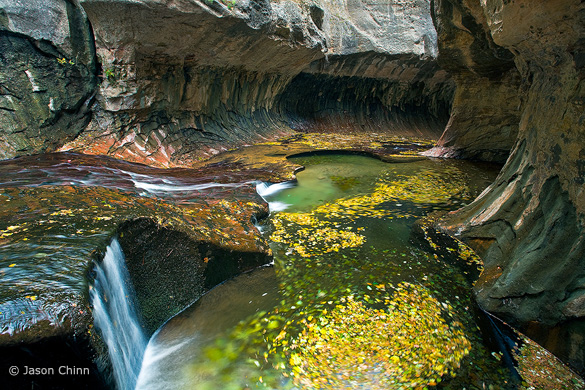
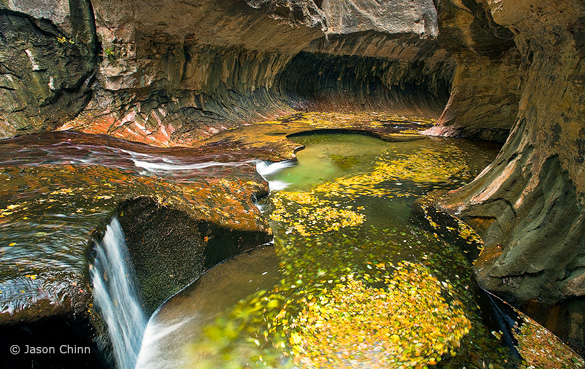
“Subway 1” by Jason Chinn, original version
Thanks to all of you who continue to submit photographs for this critique. The Flickr pool keeps growing, and many more outstanding images have been added to the collection.
This week’s photo is by Jason Chinn from the Subway in Zion National Park. I chose it because it’s a beautiful photograph, with many lessons to impart, and also because the Subway is a special place to me. My wife Claudia and I hiked to the Subway back in 1988 when hardly anyone knew about it. Four miles of thrashing through brush and sloshing up the stream led us to this unique and beautiful place—a slot canyon that widens at the bottom into a tube (hence the name). I still have a couple of 35 mm slides from that day.
I like many things about this image, but let’s start with what’s not there. In his comments on Flickr Jason says that this was made on a cloudy day, and he was disappointed that he didn’t find the “Subway glow.” (Here’s one example of this, or go to Flickr and do a search with the words “Subway” and “Zion.”) Personally, I don’t miss that glow in this photograph. The swirling yellow leaves in the water make this image more interesting than most of the other Subway renditions I’ve seen, and the “glow” might have been just be a distraction here.
Jason’s photograph has an appealing color palette, with yellows, rusty oranges, and greens. The composition also has a nice rhythm and flow; the stream coming in from the left leads your eye to the yellow leaves, and then to the tube of the Subway, plus there are many circles and curved lines that echo each other throughout the frame. The swirling leaves add a nice sense of movement.
I appreciate the fact that Jason didn’t try to pump up the color too much. I see many over-saturated, over-manipulated images on Flickr and elsewhere, but here I think the saturation seems just about right, and the photograph looks natural.
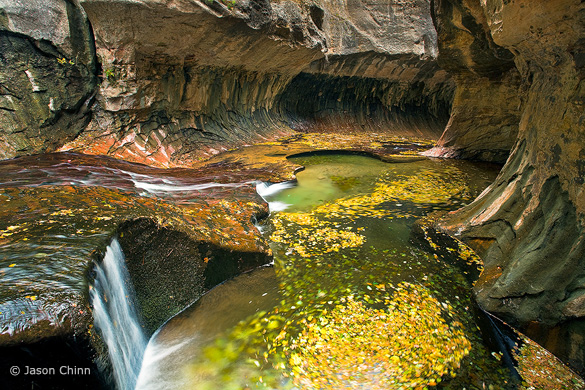
One thing I noticed is that the color balance, or white balance, seems a bit too blue. There’s a bluish tint to the water in the lower-left corner, as well as a hint of blue in the rocks near the top of the frame. Also, the bright rocks at the top-center of the photo pull my eye away from more interesting things in the middle of the picture. To a lesser extent this is also true of the bright rocks and water at the left edge. In this next version (Version B) I’ve warmed up the color balance and darkened the top and left sides of the image. (I did this in Lightroom, but you could easily do the same thing in Photoshop.) To me the result seems more coherent:
Version B, with warmer color balance and top and left edges darkened
The top and bottom of the frame still bother me though. The bright rock above the Subway at the top-center still grabs attention, and the image needs more room at the bottom, as the base of the little waterfall in the lower-left corner is cut off, and I’d like to see more of that circle of swirling leaves along the bottom edge. A wider lens would’ve helped, but looking at the EXIF data tells me that this was made with a 17 mm lens, which was probably as wide as Jason could go. Still, just pointing the camera down slightly would have lessened the space devoted to the distracting rock at the top, and shown more of the waterfall and circle of leaves at the bottom. I wonder if it would also have been possible to take a step back. Given what we have to work with here, I’ve cropped this image to eliminate some of the rock at the top of the frame (Version C). I think this works a little better, but I’m not sure. What do you think? And while you’re at it, what do you think of the other changes I made?
Version C, with the top edge cropped
Jason says that he used a polarizing filter to cut some of the reflections on the rocks and slow down the shutter speed, allowing him to blur the motion of the leaves (the polarizer cuts two stops of light, so acts like a neutral-density filter). The shutter speed was 2 seconds at f/14 and 100 ISO. A slower shutter speed would have added more motion and accentuated the swirling effect in the leaves. This could have been done by stopping down the aperture to f/22 and lowering the ISO to 50, cutting 2 1/3 stops of light and allowing a shutter speed of 10 seconds.
Despite my nitpicks I think this is a very nice photograph. In landscape photography we often set out with an idea in mind, but frequently the light and weather don’t cooperate. Rather than bemoan what’s not there, look around and ask yourself what is there. What’s special, unique, and interesting about this particular place at this particular time? Jason did just that. He was hoping to see the Subway “glow,” but clouds prevented that, so he looked around, found these pools filled with yellow leaves, and made them the centerpiece of his composition. He may have been disappointed, but personally I like this result better.
We often edit our own images with these preconceived ideas in mind. After spending time and energy to bring a concept to life, it’s easy to believe that the result is better than it is. On the other hand, we’re likely to overlook a photograph that’s didn’t match our expectations. Time and distance help. Days, weeks, or months later we’re better at judging our images objectively.
Thank you Jason for sharing your photograph! You can see more of his work on Flickr.
If you’d like your photographs considered for future critiques, just upload them to the Flickr group I created for this purpose. If you’re not a Flickr member yet, joining is free and easy. You’ll have to read and accept the rules for the group before adding images, and please, no more than five photos per person per week. I’ll post the next critique on February 9th or 10th. Thanks for participating!
by Michael Frye | Jan 27, 2010 | Critiques
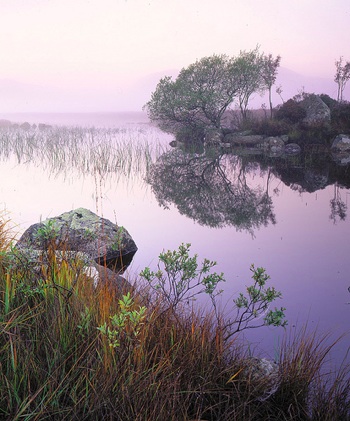
Thanks to everyone who submitted photographs for this critique. 26 people uploaded images to Flickr, and there are some outstanding images in the collection. I had to pass over a lot of interesting choices, but I’m keeping several in mind for future critiques.
I chose this image mostly for aesthetic and instructive reasons, but also because the international flavor appealed to me. The photographer, Tim Parkin, lives in Leeds, UK, and the photograph was made at Lochan Na h’Achlaise (which Tim says roughly translates as ‘Loch of the armpit’) in Rannoch Moor, Scotland. Also, I like the title Tim used on Flickr—“That Damed Loch”—although his official title isPinks, Lochan Na h’Achlaise, Rannoch Moor.
I love the soft, subtle, color palette of this photograph, with pinks, golds, and hints of green. Many photographers would be tempted to pump up the saturation, but I think that would make this image look garish and fake, and lose some of its attractive, quiet feeling.
The composition is well seen and thought out. The main focal point is the shrub on the island just right of center, and my eye moves from that down to the smaller shrub, grasses, and rocks in the foreground. Tim was careful to keep separation between everything in the foreground and the reflections in the water, with the exception of the unavoidable merger between the three tall grasses just left of center and the reeds behind them.
The small foreground shrub echoes the shape of the larger one in the background, adding some repetition and tying the foreground and background together. I often see random foregrounds that seem stuck on, included only because the photographer felt that a foreground was obligatory. If you’re going to include a foreground it has add something to the image and tie in with the background somehow, either with similar lines and shapes, or by leading the viewer’s eye into the distance. Here the foreground definitely adds interest, and echoes shapes in the background. (more…)
by Michael Frye | Dec 14, 2009 | Digital Darkroom, Photography Tips

Back in the dark ages of film, I carried several graduated neutral-density filters. They were both hard to pronounce and hard to use. First I had to decide which one to pull out—one, two, or three stops? Hard edge or soft? Then, after mounting one on the lens, I struggled to adjust it. The transition—the “graduated” part of the filter—could be almost impossible to see through the viewfinder. The light often vanished while I was still fiddling.
With my first digital camera I realized that graduated filters were no longer necessary. I could recreate the same effect in Photoshop, with more ease and control. And now the latest versions of Lightroom and Adobe Camera Raw even have built-in graduated filter tools. The photographs above show a before-and-after version done with Lightroom—original on the left, digital graduated filter applied on the right to lighten the foreground.
My latest article in the December issue of Digital Photo magazine (formerly PC Photo), titled Digital Graduated Filters, describes how to use the Graduated Filter tools in Lightroom and Camera Raw, plus how to achieve the same effect with Photoshop. The article isn’t on the their web site, but you can find the magazine at newsstands now. I have a related article on my site with some, but not all, of the same material.
by Michael Frye | Dec 9, 2009 | Announcements, Workshops
 Do you have a love-hate relationship with Photoshop? You’re not alone. One the one hand, it’s an incredibly powerful tool, capable of doing fantastic things. You know that if you mastered this program you could get the most out of your images and make beautiful prints. On the other hand, Photoshop can be cryptic, complex, and confusing. The learning curve can seem downright crooked.
I was lucky. When I first started using Photoshop in the late ’90s, I got to spend a weekend with Bill Atkinson, who probably knew more about digital imaging than anyone else in the world at the time (maybe he still does). He started me in the right direction and helped me avoid the confusion caused by gathering random bits of information from books and the internet. Like Charlie Cramer, Keith Walklet, and many other fine-art photographers Bill taught, I still use a variation of the simple, powerful, and flexible workflow that Bill showed me.
I’ve since taught Photoshop (and now Lightroom) skills to dozens of people in workshops for West Coast Imaging and The Ansel Adams Gallery. I try to make the complexities of Photoshop easy to understand. The truth is that Photoshop is simple. Anyone can learn to use it. And if you’re already familiar with it, you can learn to harness its full power. The secret is that you don’t have to deal with most of the tools. If you learn to use a few powerful tools well, you can do almost anything in Photoshop.
My next workshop with The Ansel Adams Gallery, Digital Printing and the Zone System (January 19 – 23, 2010) is designed for people who already have some Photoshop experience but want to master this powerful beast. You’ll learn both simple and advanced techniques for getting the most out of your images and making beautiful, fine-art prints. I included the Zone System in the title because getting good exposures in the field is vital to getting good results in Photoshop, so we’ll be working with the entire process, from capture to print. The Zone System also gives us a framework for understanding contrast throughout the workflow—an important tool in this age of HDR. Here’s a partial list of the topics covered:
– Zone System Exposure for Digital Cameras
– Color Management
– Overall workflow
– Raw Image Processing
– Making a Master File
– Using Layers for Flexibility
– Controlling Contrast
– Mastering Curves
– Flexible Dodging and Burning
– Retouching
– Making Difficult Selections Easy
– Converting to Black and White
– Sharpening
– Combining Images for Greater Depth of Field
– Combining Images to Expand Dynamic Range, both with HDR and Photoshop
There’s still space available in the class if you’d like to join us. Click here to register or get more information.
So how do you feel about Photoshop? Do you love it, hate it, or both? And if you’ve learned to love it, how did you get there?
By the way, I’m planning to add more Photoshop tips and tutorials to my web site soon, but for now here’s one tip that you might find interesting, about imitating the effect of a graduated neutral-density filter.