by Michael Frye | Feb 17, 2010 | Critiques
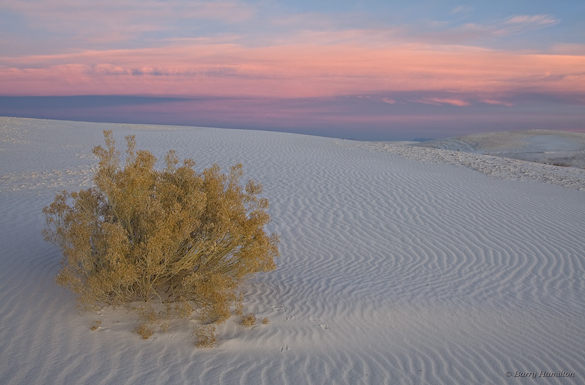
“Scrub, Before the Dawn” by Barry Hamilton
This week’s photo, by Barry Hamilton, is from White Sands National Monument, New Mexico. It features a simple, strong composition, with a clear focal point—the bush. That bush is too near the left edge of the photograph to qualify for the rule of thirds, but I think it works because it’s balanced by the ripples in the dune and the pink clouds. Yet another successful violation of the rule of thirds!
The pre-dawn glow is beautiful. Even though the sun wasn’t up yet, the light has a strong direction from the right, bringing out the texture of the dune. (Soft light with direction is one the subtleties I talk about in this article from Outdoor Photographer.) The pinks, golds, and blues form a pleasing color palette. Viewed larger you can see some nice details, like the animal tracks in the sand.
Barry says he found this shrub while scouting the day before. In my critique from two weeks ago I talked about the importance of flexibility, of adapting to conditions when the light and weather don’t meet your expectations. But that doesn’t mean you shouldn’t plan; planning and scouting are still vital components of landscape photography. The more intimately you know a location, the better your photographs will be. When traveling I’d rather spend two weeks in one area, getting to know the best viewpoints and understanding how the light changes, than spend two days apiece in seven different spots.
Technically this photograph is well executed. The contrast in this scene was low, so that made the exposure easy. There’s a lot of depth—the bush was only a few feet away from the camera—but everything appears to be in focus. That seems surprising, since the aperture was only f/9, but Barry told me that he took three frames, each focused at different distances, and blended them together in Photoshop to get the necessary depth of field.
This is a technique I use fairly often when I can’t get everything in focus with my smallest aperture. But with a wide-angle lens like this (28mm), properly focused, it should have been relatively easy to get enough depth of field at a small aperture like f/22. I can only guess that Barry was concerned that his lens wouldn’t be sharp at its smallest opening. Small apertures can cause diffraction, and a theoretical softening of the image. But I don’t believe theories unless I’ve tested them myself. I haven’t used Barry’s lens, a Canon 24-105mm f/4L, but with my 17-40 f/4L and 70-200 f/4L lenses I’ve found that while the center is sharper at middle apertures like f/8 and f/11—which fits with the theory—the corners are much crisper at f/22. So I’d rather sacrifice a little bit of sharpness in the center to gain a lot at the edges. Portrait photographers may not care about corner detail, but landscape photographers should. It’s important to test your equipment under conditions that are typical for you and the type of images you make.
One thing that struck me immediately about this photograph is that it looks flat—that is, lacking in contrast, especially in the foreground. Raw files often seem rather dull at first. (This is an issue I address in my Zone System article for Outdoor Photographer.) Here’s another version where I increased the contrast and lightened the foreground. The added contrast incidentally boosted the saturation as well.
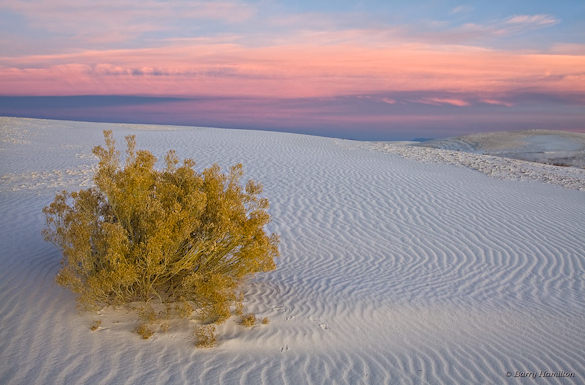
Modified version with the contrast increased and foreground lightened
I also warmed up the color balance slightly, but not enough to eliminate the blue tint in the shadowed sides of the ripples. Part of what makes this image effective is the color contrast between the warm yellowish tint of the bush and the cooler blues in the dune, and I didn’t want to lose that by completely neutralizing the tones of the sand. A neutral color balance is not always as expressive as one with a subtle tint.
Digital imaging has given us tremendous power and flexibility in processing our images and changing their appearance. Most people, if they set their minds to it, can learn the tools of Photoshop, Lightroom, Nikon Capture, or whatever software they prefer. I think it’s more difficult to know what to do with those tools—to find the right color balance, or know when you’ve added enough contrast, but not too much. Of course these things are subjective; there are no right or wrong answers. But I think it helps to gain a frame of reference by spending time in galleries and museums. Look at the contrast in prints by Edward Weston and Ansel Adams, or the treatment of color balance and saturation by a modern color darkroom master like Christopher Burkett.
Thanks Barry for sharing your photograph! You can view more of Barry’s work on Flickr.
If you’d like your images considered for future critiques, just upload them to the Flickr group I created for this purpose. If you’re not a Flickr member yet, joining is free and easy. You’ll have to read and accept the rules for the group before adding images, and please, no more than five photos per person per week. I’ll post the next critique on February 23rd or 24th. Thanks for participating!
by Michael Frye | Feb 3, 2010 | Critiques
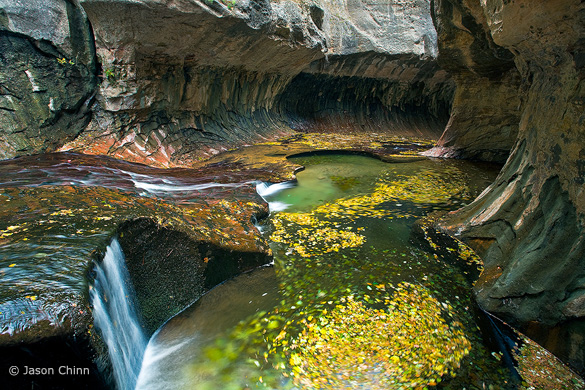
“Subway 1” by Jason Chinn, original version
Thanks to all of you who continue to submit photographs for this critique. The Flickr pool keeps growing, and many more outstanding images have been added to the collection.
This week’s photo is by Jason Chinn from the Subway in Zion National Park. I chose it because it’s a beautiful photograph, with many lessons to impart, and also because the Subway is a special place to me. My wife Claudia and I hiked to the Subway back in 1988 when hardly anyone knew about it. Four miles of thrashing through brush and sloshing up the stream led us to this unique and beautiful place—a slot canyon that widens at the bottom into a tube (hence the name). I still have a couple of 35 mm slides from that day.
I like many things about this image, but let’s start with what’s not there. In his comments on Flickr Jason says that this was made on a cloudy day, and he was disappointed that he didn’t find the “Subway glow.” (Here’s one example of this, or go to Flickr and do a search with the words “Subway” and “Zion.”) Personally, I don’t miss that glow in this photograph. The swirling yellow leaves in the water make this image more interesting than most of the other Subway renditions I’ve seen, and the “glow” might have been just be a distraction here. (more…)
by Michael Frye | Feb 3, 2010 | Critiques
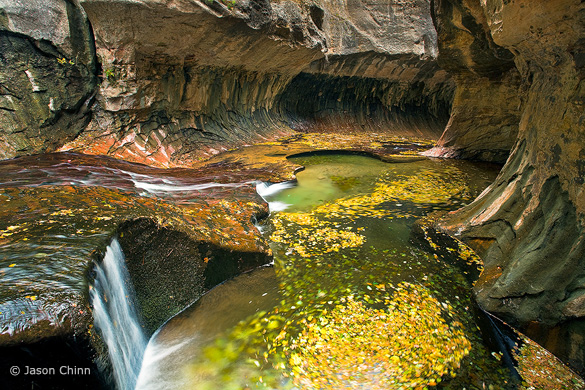
“Subway 1” by Jason Chinn, original version
Thanks to all of you who continue to submit photographs for this critique. The Flickr pool keeps growing, and many more outstanding images have been added to the collection.
This week’s photo is by Jason Chinn from the Subway in Zion National Park. I chose it because it’s a beautiful photograph, with many lessons to impart, and also because the Subway is a special place to me. My wife Claudia and I hiked to the Subway back in 1988 when hardly anyone knew about it. Four miles of thrashing through brush and sloshing up the stream led us to this unique and beautiful place—a slot canyon that widens at the bottom into a tube (hence the name). I still have a couple of 35 mm slides from that day.
I like many things about this image, but let’s start with what’s not there. In his comments on Flickr Jason says that this was made on a cloudy day, and he was disappointed that he didn’t find the “Subway glow.” (Here’s one example of this, or go to Flickr and do a search with the words “Subway” and “Zion.”) Personally, I don’t miss that glow in this photograph. The swirling yellow leaves in the water make this image more interesting than most of the other Subway renditions I’ve seen, and the “glow” might have been just be a distraction here.
Jason’s photograph has an appealing color palette, with yellows, rusty oranges, and greens. The composition also has a nice rhythm and flow; the stream coming in from the left leads your eye to the yellow leaves, and then to the tube of the Subway, plus there are many circles and curved lines that echo each other throughout the frame. The swirling leaves add a nice sense of movement.
I appreciate the fact that Jason didn’t try to pump up the color too much. I see many over-saturated, over-manipulated images on Flickr and elsewhere, but here I think the saturation seems just about right, and the photograph looks natural.
One thing I noticed is that the color balance, or white balance, seems a bit too blue. There’s a bluish tint to the water in the lower-left corner, as well as a hint of blue in the rocks near the top of the frame. Also, the bright rocks at the top-center of the photo pull my eye away from more interesting things in the middle of the picture. To a lesser extent this is also true of the bright rocks and water at the left edge. In this next version (Version B) I’ve warmed up the color balance and darkened the top and left sides of the image. (I did this in Lightroom, but you could easily do the same thing in Photoshop.) To me the result seems more coherent:
Version B, with warmer color balance and top and left edges darkened
The top and bottom of the frame still bother me though. The bright rock above the Subway at the top-center still grabs attention, and the image needs more room at the bottom, as the base of the little waterfall in the lower-left corner is cut off, and I’d like to see more of that circle of swirling leaves along the bottom edge. A wider lens would’ve helped, but looking at the EXIF data tells me that this was made with a 17 mm lens, which was probably as wide as Jason could go. Still, just pointing the camera down slightly would have lessened the space devoted to the distracting rock at the top, and shown more of the waterfall and circle of leaves at the bottom. I wonder if it would also have been possible to take a step back. Given what we have to work with here, I’ve cropped this image to eliminate some of the rock at the top of the frame (Version C). I think this works a little better, but I’m not sure. What do you think? And while you’re at it, what do you think of the other changes I made?
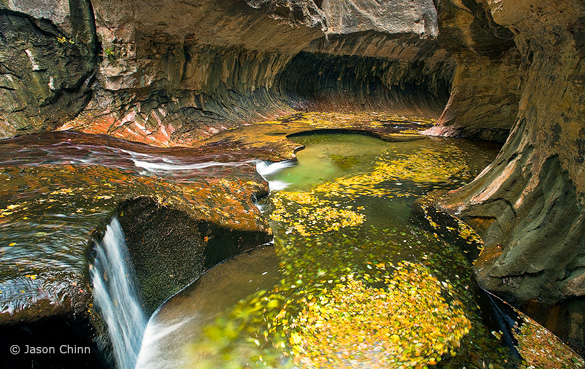
Version C, with the top edge cropped
Jason says that he used a polarizing filter to cut some of the reflections on the rocks and slow down the shutter speed, allowing him to blur the motion of the leaves (the polarizer cuts two stops of light, so acts like a neutral-density filter). The shutter speed was 2 seconds at f/14 and 100 ISO. A slower shutter speed would have added more motion and accentuated the swirling effect in the leaves. This could have been done by stopping down the aperture to f/22 and lowering the ISO to 50, cutting 2 1/3 stops of light and allowing a shutter speed of 10 seconds.
Despite my nitpicks I think this is a very nice photograph. In landscape photography we often set out with an idea in mind, but frequently the light and weather don’t cooperate. Rather than bemoan what’s not there, look around and ask yourself what is there. What’s special, unique, and interesting about this particular place at this particular time? Jason did just that. He was hoping to see the Subway “glow,” but clouds prevented that, so he looked around, found these pools filled with yellow leaves, and made them the centerpiece of his composition. He may have been disappointed, but personally I like this result better.
We often edit our own images with these preconceived ideas in mind. After spending time and energy to bring a concept to life, it’s easy to believe that the result is better than it is. On the other hand, we’re likely to overlook a photograph that’s didn’t match our expectations. Time and distance help. Days, weeks, or months later we’re better at judging our images objectively.
Thank you Jason for sharing your photograph! You can see more of his work on Flickr.
If you’d like your photographs considered for future critiques, just upload them to the Flickr group I created for this purpose. If you’re not a Flickr member yet, joining is free and easy. You’ll have to read and accept the rules for the group before adding images, and please, no more than five photos per person per week. I’ll post the next critique on February 9th or 10th. Thanks for participating!
by Michael Frye | Jan 27, 2010 | Critiques
Thanks to everyone who submitted photographs for this critique. 26 people uploaded images to Flickr, and there are some outstanding images in the collection. I had to pass over a lot of interesting choices, but I’m keeping several in mind for future critiques.
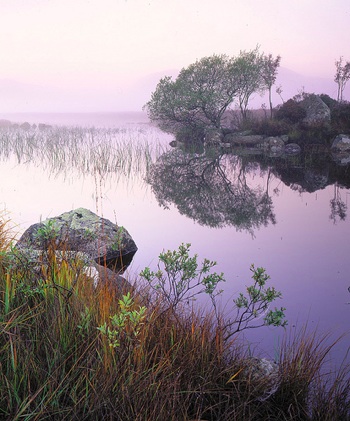
I chose this image mostly for aesthetic and instructive reasons, but also because the international flavor appealed to me. The photographer, Tim Parkin, lives in Leeds, UK, and the photograph was made at Lochan Na h’Achlaise (which Tim says roughly translates as ‘Loch of the armpit’) in Rannoch Moor, Scotland. Also, I like the title Tim used on Flickr—“That Damed Loch”—although his official title isPinks, Lochan Na h’Achlaise, Rannoch Moor.
I love the soft, subtle, color palette of this photograph, with pinks, golds, and hints of green. Many photographers would be tempted to pump up the saturation, but I think that would make this image look garish and fake, and lose some of its attractive, quiet feeling.
The composition is well seen and thought out. The main focal point is the shrub on the island just right of center, and my eye moves from that down to the smaller shrub, grasses, and rocks in the foreground. Tim was careful to keep separation between everything in the foreground and the reflections in the water, with the exception of the unavoidable merger between the three tall grasses just left of center and the reeds behind them.
The small foreground shrub echoes the shape of the larger one in the background, adding some repetition and tying the foreground and background together. I often see random foregrounds that seem stuck on, included only because the photographer felt that a foreground was obligatory. If you’re going to include a foreground it has add something to the image and tie in with the background somehow, either with similar lines and shapes, or by leading the viewer’s eye into the distance. Here the foreground definitely adds interest, and echoes shapes in the background. (more…)
by Michael Frye | Dec 14, 2009 | Digital Darkroom, Photography Tips

Back in the dark ages of film, I carried several graduated neutral-density filters. They were both hard to pronounce and hard to use. First I had to decide which one to pull out—one, two, or three stops? Hard edge or soft? Then, after mounting one on the lens, I struggled to adjust it. The transition—the “graduated” part of the filter—could be almost impossible to see through the viewfinder. The light often vanished while I was still fiddling.
With my first digital camera I realized that graduated filters were no longer necessary. I could recreate the same effect in Photoshop, with more ease and control. And now the latest versions of Lightroom and Adobe Camera Raw even have built-in graduated filter tools. The photographs above show a before-and-after version done with Lightroom—original on the left, digital graduated filter applied on the right to lighten the foreground.
My latest article in the December issue of Digital Photo magazine (formerly PC Photo), titled Digital Graduated Filters, describes how to use the Graduated Filter tools in Lightroom and Camera Raw, plus how to achieve the same effect with Photoshop. The article isn’t on the their web site, but you can find the magazine at newsstands now. I have a related article on my site with some, but not all, of the same material.