In the Moment:
Michael Frye's Landscape Photography Blog
by Michael Frye | Apr 21, 2010 | Critiques
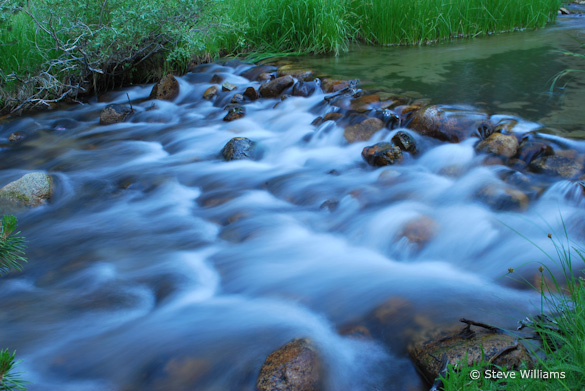
“Rock Creek—Beautiful Stream” by Steve Williams
I’m pleased to announce that, beginning this week, each person who’s image is selected for a critique will receive a free 16×20 matted print courtesy of the folks at Aspen Creek Photo. Aspen Creek was created by Rich and Susan Seiling, the founders of West Coast Imaging. I’ve used West Coast Imaging for all my drum scans, and know they set high standards and produce great results. Aspen Creek Photo offers excellent prints, similar in many ways to the high-end work produced at West Coast Imaging, at very affordable prices.
Now, on to the critique… This week’s photograph was made by Steve Williams along Rock Creek, on the eastern slope of my home mountain range, the Sierra Nevada. The small cascade is an intriguing subject, and the slow shutter speed (1/2 second) that Steve chose works well, giving the water that silky, flowing look, and creating a contrast in textures betweensmooth, ethereal water and solid rocks and grasses. There’s a nice, quiet, intimate feeling to the image; it seems like a peaceful place that I would enjoy spending time at.
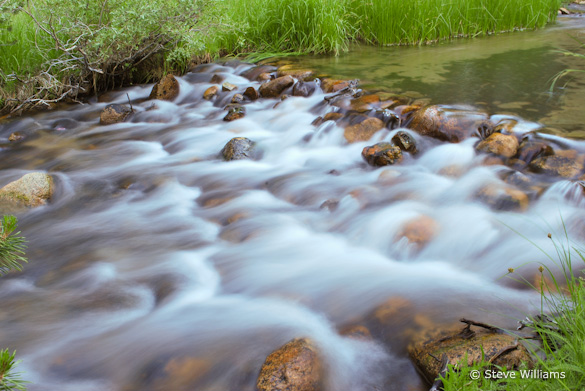
A small aperture, f/20, kept everything in focus. At first glance the exposure seemed a bit dark to me, and the white balance looked too blue—the white water, or what should be white water, has a distinct blue cast. Using the eyedropper tool in Lightroom, I clicked on the white water, and that made an immediate improvement. The photograph seems warmer, the colors livelier, and the scene more inviting. This color temperature change also boosted the red and green channels, making the image appear brighter as well as warmer. The exposure now looks perfect.
After the white balance was adjusted with the eyedropper in Lightroom
How you handle white balance (or color temperature, or color balance) depends, to a great degree, on whether you’re shooting Raw or JPEG. With Raw the white balance isn’t set in the camera, so it’s easy to adjust later in software. I always shoot in Raw, and usually just leave the camera set to automatic white balance, because it’s a simple matter to make corrections later in Lightroom with the eyedropper or color temperature slider. If the color balance might be tricky, as when photographing flowers or fall foliage at dusk, I include a white or gray card in one of the frames, then click on that card with the Eyedropper later in Lightroom and apply that same white balance setting to the other images made in the same light.
With JPEGs the white balance is set in the camera. While you can adjust it later in software, big changes can be problematic, so it becomes more critical to get it right in the field. You’ll need to set the white balance manually more often.
When you do need to adjust the white balance of a JPEG in software, it’s much easier to do so in Lightroom or Camera Raw, using that Eyedropper tool and the Color Temperature slider, than in Photoshop proper. (To open JPEGs in Camera Raw, select the image in Bridge, then choose File > Open in Camera Raw.)
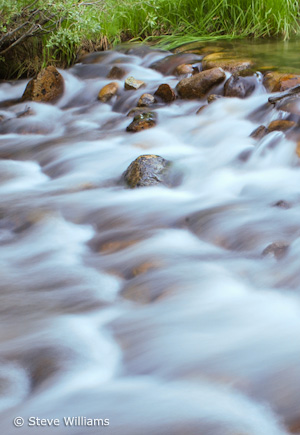
First crop, eliminating distracting elements along the bottom and left edges
Changing the white balance in this photograph made a big improvement, but the composition still seemed a bit messy. Edges are always critical, and there are a number of objects here that are half-in, half-out of the frame, including the tips of two branches on the left edge, a rock just above them, and a rock along the bottom edge. The lower-right corner also seems a bit cluttered.
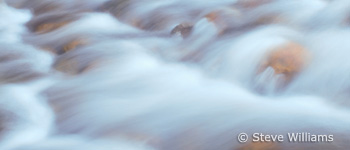
With that in mind I cropped this into a vertical, including just the cascade and the far bank. This was better, but it still seemed like there was something missing. When in doubt I ask myself what catches my eye the most. In this case the answer was easy: the flowing water. So I made several other, tighter crops, picking out interesting sections of the small rapid.
While Steve’s original composition is not exactly a wide, sweeping landscape, it does capture enough of the scene to give us some sense of place—a quiet, grass-lined creek. While I think my tighter crops are stronger designs, they lose some of that feeling and sense of place. This points to a dilemma that photographers often confront. We may prefer to capture a wider view, one that shows what an area looks like. Sometimes we can do so and make a clean, strong composition in the process, but often that wide view includes extraneous clutter. If we pick out a detail, a small piece of that scene, we can often make a strong design out of it, but then lose the context and sense of place.
So what do you do? Capture both. Take the wide view, but then keep looking, and find those interesting details.
When evaluating the images later, you’ll probably find the abstract close-ups more compelling. In photography, design always trumps subject. There’s something about interesting lines, shapes, and patterns that catches our attention and intrigues us as viewers. A photograph needs an incredibly compelling subject—like an exploding volcano, or a wolf dragging down a caribou—to overcome poor design.
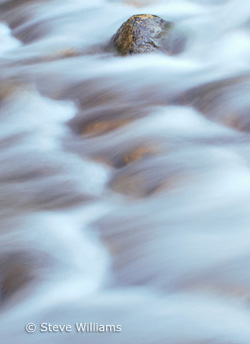
One more thing: By making these crops I’m trying to show alternate compositions, things that might have worked better than the original image, and trying to give you ideas for finding better compositions in the field. But I don’t mean to suggest that it’s okay to be sloppy, to capture a wide view with the intention of cropping later. Removing large sections of an image throws away too many of those megapixels you’ve paid so much for, leaving you with a low-resolution image that can’t be enlarged. While minor trimming is fine, it’s always better to frame the scene as precisely as possible in the camera, and keep as much of that precious resolution as possible.
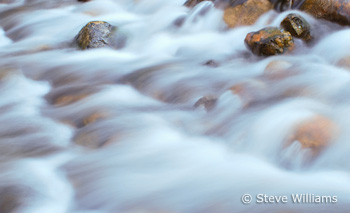
Fourth crop
Thanks Steve for sharing your image! You can see more of his work on Flickr.
As part of being chosen for this week’s critique Steve will receive a free 16×20 matted print courtesy of the folks at Aspen Creek Photo. If you’d like your images considered for future critiques, just upload them to the Flickr group I created for this purpose. If you’re not a Flickr member yet, joining is free and easy. You’ll have to read and accept the rules for the group before adding images, and please, no more than five photos per person per week. I’ll be posting the next critique on April 27th or 28th. Thanks for participating!
by Michael Frye | Feb 24, 2010 | Critiques
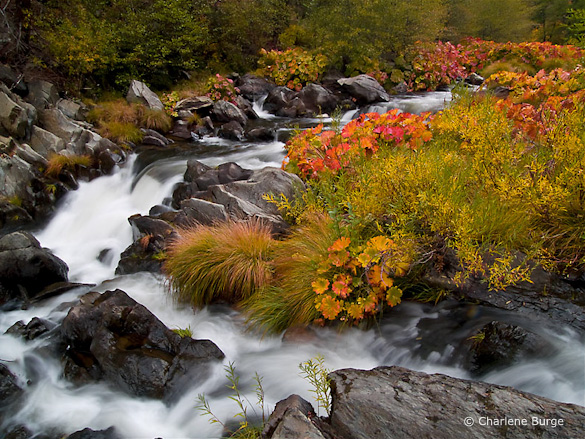
“A Walk Along the Cascades” by Charlene Burge
This week’s photograph, by Charlene Burge, is from the Plumas National Forest near the northern end of my home mountain range, the Sierra Nevada. The colorful plants along the creek are called wild rhubarb or Indian rhubarb. They’re found in a few places in and around Yosemite, but I was pleasantly surprised to discover this photo and see that they grow further north as well. It’s hard to tell from this image, but their leaves are quite large, sometimes more than a foot in diameter. Since they’re colorful in the fall, and grow along creeks, these plants make great photo subjects.
Color is one of the most appealing things about this image. The reds and oranges of the rhubarb draw the eye and contrast with the greens of the grasses and trees. The soft light of an overcast day worked perfectly for this subject. Sunlight would have been too harsh, creating bright highlights and dark shadows that would have overwhelmed the colors.
This seems counterintuitive to many beginning photographers—they assume that sunlight is a requirement for good photos, and that overcast is inherently dull. And that’s true for many subjects—the gray granite of El Capitan, for instance, seems lifeless on a cloudy day. But colorful subjects often look best with soft light. The even illumination gives prominence to color contrast rather than light-and-dark contrast.
While we’re on the subject of color, the white balance looks good here—the rocks and white water appear neutral, and everything else is the appropriate hue, except perhaps the greens, which look a bit too red to me. Usually I see the opposite problem—greens that look blue-green. Here the greens are too warm, so they blend with the surrounding golds and oranges, and some of the natural warm-cool color contrast has been lost. I used Lightroom to remove some of that reddish tint in this next version. The difference is subtle, and takes a good monitor to see, but to me it’s significant.
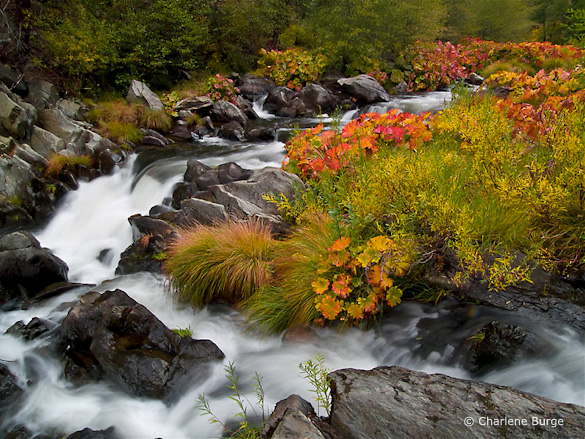
With the greens adjusted to remove the reddish tint
This image was captured at f/22 with a 1/2 second shutter speed. These were appropriate choices for showing the movement of the water and getting enough depth of field to keep everything in focus. The blurred, silky look of the water creates a nice textural contrast with the rocks and vegetation. The largest cascade, however, near the middle of the frame along the left side, lacks definition—it’s mostly the same shade of white. I might have tried a slightly faster shutter speed, like 1/4 sec. or 1/8 sec., to try to keep more texture in that area without losing the flowing appearance of the water. Of course that would have required opening the aperture to f/16 or f/11, creating possible depth of field problems, or using a higher ISO, which would have added noise. In photography, everything is a compromise.
The two branches of the creek form a nice semi-circular shape and give the image structure. The top and right edges of the frame seem well placed. The lower-left corner, however, is troublesome. Bright areas along the edge of a photograph are often distracting, and here the white water in the lower-left corner pulls my eye out of the frame and away from the main centers of interest.
But having identified this problem, there may not have been a solution. Charlene told me that she couldn’t include anything to the left because she couldn’t hang out further over the water. I’m guessing that intervening vegetation blocked the view. Even if she could have pointed the camera down and to the left more, the creek obviously continues in that direction, and white water would have touched the edge of the frame somewhere. In those situations I try to put dark rocks along as much of the edge as possible, but sometimes there’s no perfect solution.
These dilemmas are common in landscape photography. A subject catches your eye, yet somehow it defies your attempts to make a clean composition. Some annoying, distracting element can’t be eliminated without losing an essential component of the scene.
Most of my best photographs have practically composed themselves; the right framing was immediately obvious. When I struggle with the composition I rarely like the end result. But there are exceptions, situations where I’ve worked with a subject for half an hour and finally found a good solution. And even if it doesn’t work I often learn something in the process. So it’s worth the effort, even if resulting image isn’t successful.
In researching my most recent book I found this quote from Ansel Adams: “I have found that when I have to labor over a composition I seldom achieve anything worthwhile.” So even the great Adams faced the same problem!
With the composition we see here, the only thing that might help prevent the eye from leaking out of that lower-left corner is to darken the water a bit, and I’ve done that in this next version. For good measure I also darkened and added contrast to that cascade near the middle-left edge to try to bring out more texture. I can’t say these changes made a big difference, but every little bit helps.
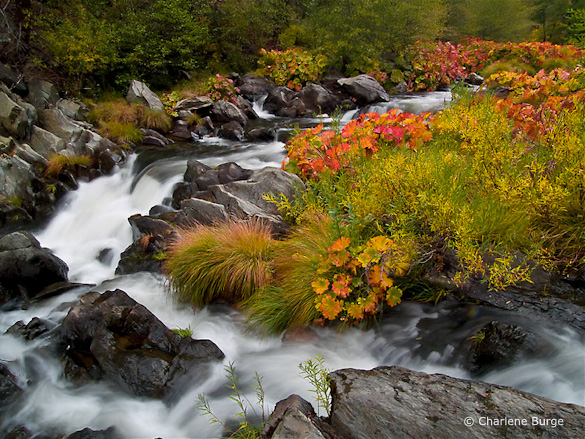
Water along the left side darkened, plus more contrast added to the large cascade
Despite my nitpicks this is a pleasing photograph of an intimate landscape. It makes me wish I had been there.
Thank you Charlene for sharing your image! You can see more of her work on Flickr.
If you’d like your images considered for future critiques, just upload them to the Flickr group I created for this purpose. If you’re not a Flickr member yet, joining is free and easy. You’ll have to read and accept the rules for the group before adding images, and please, no more than five photos per person per week. I’ll post the next critique on March 2nd or 3rd. Thanks for participating!
by Michael Frye | Feb 15, 2010 | Yosemite Photo Conditions
In my post about Horsetail Fall from February 1st I said that the ideal scenario would include a stretch of warm clear days during the peak window of light. Well we’re in that window, the weather is warm and clear, and there’s plenty of water in the fall, so conditions are perfect. It looks like somebody’s going to get some good Horsetail photos this week. The one caveat is that clouds have partially blocked the light the last few evenings. Even with mostly clear skies, a few thin clouds to the west near sunset can dull the glow. Also, the same conditions that have been bringing lots of fog to the Central Valley can create low-hanging clouds along the ridges just west of Yosemite Valley, blocking the light late in the day.
This warm weather has encouraged some flowers to bloom in the Sierra foothills, but so far I haven’t seen or heard about any poppies. Normally I wouldn’t even be thinking about poppies this early, but last year I saw them blooming on February 21st. Of course, that turned out to be the best poppy year ever in the Merced River Canyon west of Yosemite (see my posts from February, March, and April of 2009), and it’s unlikely that will happen again this year.
by Michael Frye | Nov 3, 2009 | Yosemite Photo Conditions

Last night my wife Claudia and I attended the Day of the Dead celebration in Hornitos, a tiny town in the Sierra foothills. The Stellar Gallery of Oakhurst hosted a reception in town for a Day-of-the-Dead-themed exhibit featuring work by many talented artists, including our friends Penny Otwell and Ann Mendershausen. At six p.m., under the light of a full moon, over 300 people joined the silent, candlelit procession from the town up a hill to the church and graveyard, where Rev. Steve Bulfer led a ceremony honoring the departed. Then the participants scattered throughout the graveyard to place candles on unlit graves.
This was the first time we had attended this event, and found it truly moving and inspiring. We’ll definitely be back next year. Naturally I had to try to photograph the proceedings, but it proved difficult. It was dark after all! For this image I left the shutter open for three minutes as the processioners marched up the hill, their candles forming a stream of light.
by Michael Frye | Oct 18, 2009 | Yosemite Photo Conditions

After the last storm, many people reported finding little fall color on the east side of the Sierras. Aspens that had already turned yellow were stripped bare by the wind, and the remainder were still green. I was worried that there wouldn’t be anything to photograph during my fall color workshop on Monday.
But those green trees seem to have changed color quickly. I drove over Tioga Pass from Yosemite Valley yesterday afternoon, and breathed a sigh of relief when I caught my first glimpse of Lee Vining Canyon: all yellow. I’d say 80 percent of the trees had turned, and the remainder were yellow-green and should change completely soon.
I found a similar story around the June Lake loop, where about 60 to 70 percent of the aspens had completely turned, and the rest were on their way. I made the accompanying photograph in one of my favorite groves there. Both Lee Vining Canyon and the June Lake Loop were beautiful, and are likely to become even more photogenic in the next few days. I’ll be scouting some other locations today, and I expect to find similar conditions among the lower-elevation aspens. Nancy Boman at Murphey’s Motel in Lee Vining (a photographer’s favorite) told me that the color had arrived just within the last few days, which seems to fit the other reports I’ve heard.
On Friday I was in Yosemite Valley for a private workshop. The most striking change was the amount of water in Yosemite Falls and the Merced River. We had nice morning light on the upper fall and photographed reflections in the river. There was also some mist in the meadows. The water level will drop rapidly during the next week, as there’s not much of a snow pack to feed it, and the mist will also probably dissipate as the meadows dry out, but it might last a few more days.
Fall color in the Valley is developing rapidly. The sugar maple near the chapel is gorgeous, and the native big-leaf maples are about 80 percent turned. The cottonwoods are about halfway there. The dogwoods and oaks are just getting started, but it seems like things are moving quickly, so next weekend might be close to peak. Barring storms, the following weekend (two weeks from now) should also be good.
A minor weather system is expected Monday, and temperatures will drop early next week, so that could change the outlook. But fall-color gloom has turned to hope in just a few days.