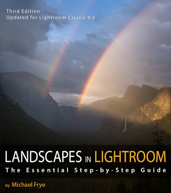
In the Moment:
Michael Frye's Landscape Photography Blog

We're Experiencing Technical Difficulties

My web site was down for several hours this morning, and over the last hour or so has been up and down several times. I’m sorry for any inconvenience this may be causing. If you’ve tried to purchase my new Landscapes in Lightroom 5 ebook and encountered a problem, please try again.

There is apparently a server problem at my web hosting company, Hostgator. This issue has affected customers of several web hosting companies, including Bluehost, HostGator, HostMonster and JustHost, which are all owned by the same parent company. We’re told that there may be intermittent issues for a while, so if you experience further problems please try again later. Unfortunately our email is affected too, so if you’ve had trouble contacting us, please try again.

Again, I apologize for the inconvenience!

— Michael Frye
My New eBook is Now Available!

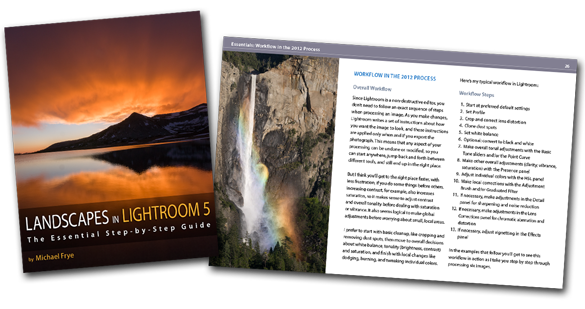
LR5-CoverSpread

Landscapes in Lightroom 5: The Essential Step-by-Step Guide

PDF ebook with video tutorials
87 double-page spreads
14.95

Add to Cart View Cart

Special introductory offer: for a limited time get 20% off by using the code LR520 at checkout. Offer expires at midnight Pacific time on August 4th.


Here it is! My latest ebook, Landscapes in Lightroom 5: The Essential Step-by-Step Guide, is now available.

I’m really excited about this new ebook, because I’ve been able to incorporate features that make this more of a hands-on learning experience. First, you can download the original Raw files used as examples in the ebook, and then follow along with each step yourself – just as if you were attending one of my workshops.

Second, when you purchase the ebook you get exclusive access to eight videos demonstrating different aspects of Lightroom’s Develop Module, like using the Adjustment Brush, Spot Removal Tool, and Point Curve, advanced retouching in Lightroom, and much more. It’s great to read about a tool or technique; it’s even better to watch a demonstration, and then try it yourself on the same image.

(more…)

Syncing the PDF to Your iPad

Syncing the PDF to your iPad

Here’s how to sync the PDF from your computer to iPad using iTunes:

1. Open iTunes, then go to File > Add to Library:

iPad1


2. Navigate to the landscapes-in-lr.pdf file (in your Downloads folder, unless you moved it), select it, and click Open:

iPad2


3. In the upper-right corner of iTunes, select your iPad (in older versions of iTunes you’ll need to select your iPad from the list on the left-hand side):

iPad3


4. Along the top row of the iTunes window, select Books:

iPad4


5. Near the upper-left, make sure Sync Books is checked. Underneath that you can choose “All Books” or “Selected Books.” If you choose Selected Books, make sure “Books and PDF files” is selected from the pull-down menu just below, and then make sure the landscapes-in-lr.pdf file is checked in the list below that:

iPad5


6. Then click on Apply down in the lower-right corner:

iPad6


7. When it’s finished syncing, open iBooks on your iPad. Tap Collections at the top, select PDFs, and you should see the Landscapes in Lightroom ebook at the top of the list (it might take a few seconds to appear):

iPad7

New eBook Coming Soon!

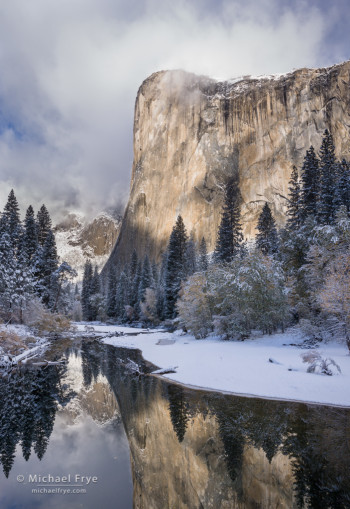
El Capitan and the Merced River after an autumn snowstorm, Yosemite NP, CA, USA

El Capitan and the Merced River after an autumn snowstorm, Yosemite NP, CA, USA


Many people have been asking me for a sequel to Light & Land, my first eBook about processing landscape photographs. Well I’m very pleased to announce that it will be coming soon – this week in fact!

This photograph of El Capitan is one of the examples in the new eBook. It was a high-contrast scene; you can see the original, unprocessed Raw file below, with its inky shadows and washed-out highlights. In the past, a scene like this might have required using HDR, or blending exposures manually in Photoshop.

But I didn’t use HDR, or any kind of exposure blending, to make the final image you see here; it’s just one image, processed entirely in Lightroom. In the new eBook I show you exactly how I went from that original Raw file to the finished version – and how you can do that with your own photographs.

There are more step-by-step examples in the eBook, and a lot of other exciting features. I’ll tell you all about it soon – stay tuned!

In the meantime, if you haven’t seen it yet, you might want to watch the video I made last year about the tone controls in Lightroom. It’s been very popular, with over 36,000 views on YouTube — an amazing total for a 25-minute how-to video about such a specialized subject. Thanks to all of you who’ve watched; I really appreciate the support!

— Michael Frye

(more…)

Redwoods, Fog, and Serendipity

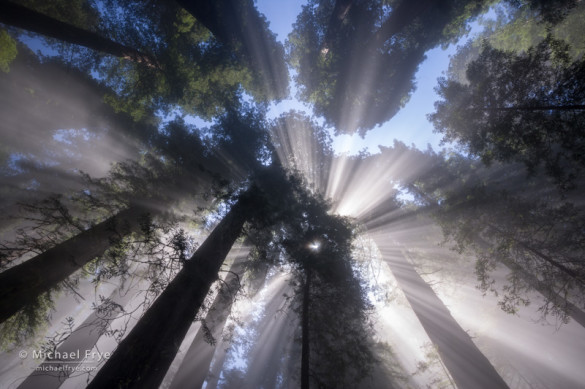
Sunbeams through the redwood canopy, Del Norte Coast Redwoods SP, CA, USA

Sunbeams through the redwood canopy, Del Norte Coast Redwoods SP, CA, USA


Weather always plays a big role in landscape photography. I study the weather so that I can put myself – and my workshop students – in the right place at the right time. But a little luck always helps.

During my recent workshops up in the redwood country we found some wonderful juxtapositions of fog and sunlight. One morning, during the second week, we pulled up to a trailhead and everyone immediately got out their cameras because we saw beautiful godbeams right from the parking area. But, as it turns out, we didn’t need to rush. Usually these sun-breaking-through fog moments are fleeting, but it turns out that we were right at the top of a relatively stable fog bank, so the mixture of sun and fog lasted for hours along parts of the trail. The photograph above is just one of many sunbeam photographs I made that morning, and everyone in the group came away with some great images from that day.

(more…)