In the Moment:
Michael Frye's Landscape Photography Blog
by Michael Frye | Jan 19, 2011 | Yosemite Photo Conditions
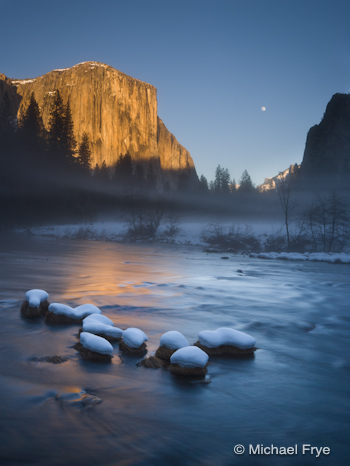
The moon rising between El Capitan and Cathedral Rocks from Valley View
Clear skies have allowed my workshop students and me to photograph the rising moon on three successive days: over Half Dome on Sunday, between El Capitan and Cathedral Rocks on Monday, and between Half Dome and El Capitan from Tunnel View yesterday. Naturally the timing for this workshop (Photoshop and Digital Printing, with The Ansel Adams Gallery) was planned to take advantage of these lunar opportunities, but you never know what kind of weather you’ll get, so we’ve been lucky.
Where November and December were exceptionally wet, January has been dry so far. Yosemite photographers often hope for precipitation and the opportunity to photograph a clearing storm, but every set of conditions creates unique opportunities. The clear, warm weather is melting the abundant snow pack and producing an exceptionally high flow in Yosemite Falls. It looks more like March than January. The light, however, is still at its winter angles, striking the falls shortly after sunrise—much better than in March, when the sun doesn’t reach the waterfall until it’s high in the sky.
With more clear, warm weather in the forecast, the water flow should stay high or even increase, and we could have great opportunities to photograph Yosemite Falls for several weeks.
If you had a chance to photograph the rising moon the last few days, or the high water in Yosemite Falls this winter, I’d love to see the images, so please post a link in the comments.
by Michael Frye | Jan 14, 2011 | Critiques

“Ptarmigan Lake” by Chris Alexander
Composition
This week’s photograph was made by Chris Alexander in Glacier National Park, Montana. That’s the second time recently that I’ve critiqued a photo from this park. Obviously—and no surprise to anyone who’s been there—a beautiful place!
This composition works very well. The bottom two-thirds of the photograph has sweeping, repeating, U-shaped curves that help tie everything together and frame the background peaks. The lake and mountains provide focal points: my eyes work in a triangle around the frame, going from the lake to the prominent peak on the right, over to the peaks on the left, then back to the lake, sometimes detouring around the lower basin to look at the snow patches and trail. The overall design is simple and strong.
If I could quibble with something, it would be the bright spots along the edges that tend to draw my eyes out of the frame, including the snow patch in the lower-left corner, another snow patch near the upper-right corner, and of course the sky.
(more…)
by Michael Frye | Jan 12, 2011 | Announcements
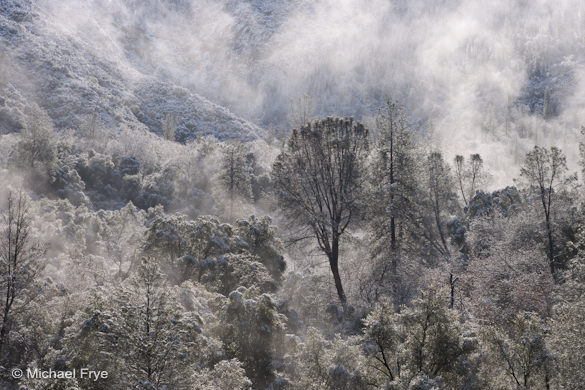
5. Gray pines after a snowstorm
Jim Goldstein posted his Best Photos of 2010 Blog Project today, with the top images of 2010 from 162 photographers, including me of course. It’s worth spending some time looking through these photographs, as there’s a lot of great work.
For me, picking out my best photos from last year was a difficult, fascinating, but ultimately rewarding process.
(more…)
by Michael Frye | Jan 11, 2011 | Yosemite Photo Conditions
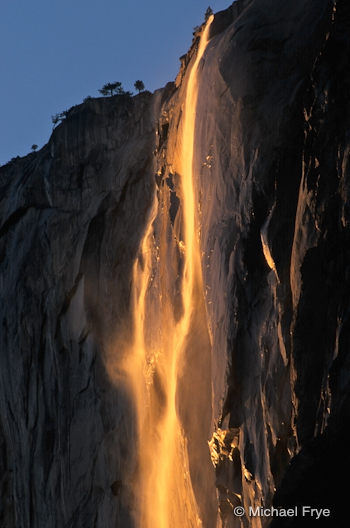
If you’re hoping to photograph Horsetail Fall this February, here’s a post from last year that outlines some of the basics about the timing and best locations. You’ll also find an article on my web site with a detailed description of the factors that go into determining the best dates to photograph this phenomenon.
Since every astronomy program seems to disagree with every other one, it’s hard to figure out exactly what the best dates are each year, but it appears that the window of best light will be a little later this February, from about the 12th to 22nd. Good luck!
by Michael Frye | Jan 7, 2011 | Announcements
The polls are closed, the votes are in, and here are the winners—as chosen by you, the readers.
The response went far beyond my expectations. Over 100 people chimed in with their picks, and Claudia had to create a spreadsheet to keep track of them all! My heartfelt thanks to all of you who voiced your opinions. I really appreciate your taking the time to help me make these difficult choices. (Click here to see all 46 original nominees.)
Although I reserved the right to override theses votes, in the end I decided that the collective wisdom was greater than mine, especially with so many people chiming in. Here’s a list of the ten images which received the most picks, and the number of votes they each received:
- Image #3, Winter sunrise from Tunnel View, 69 votes
- Image #11, Redbud reflection II, 64 votes
- Image #13, Horsetail Fall by moonlight, 64 votes
- Image #9, Painted Hills in the Temblor Range (vertical), 45 votes
- Image #18, Middle Gaylor Lake at sunset, 45 votes
- Image #32, First light on Three Brothers (second version), 45 votes
- Image #5, Gray pines after a snowstorm, 44 votes
- Image #19, Sunrise, North Peak and Greenstone Lake, 42 votes
- Image #40, Swirling mist, El Capitan Meadow, 39 votes
- Image #42, Ice sculptures and Wildcat Fall, 39 votes
(more…)
by Michael Frye | Jan 6, 2011 | Announcements
I’ll be posting my ten best photographs from 2010 tomorrow, but there’s still time to make your voice heard and help me make the selection. View the top 46 here, then just add a comment and list your favorites.
Many thanks to everyone who’s already chimed in. The response has been tremendous, and almost 100 people have voted. I really appreciate all of you taking the time to do this—you’re the best! And special thanks to those who went to the trouble of giving detailed explanations about their choices—that’s very helpful.
by Michael Frye | Jan 6, 2011 | Advanced Techniques, Digital Darkroom, Photography Tips, Video Tutorials
White Balance for Landscape Photographs – Part 3: A Special Problem from Michael Frye on Vimeo.
Here’s the third part of my video series on white balance, where I present solutions to a common problem in landscape photographs—finding the right white balance when mixing low-angle sunlight with blue sky.
If you haven’t seen them already, here are links to Part 1 and Part 2.
To see this video clearly, be sure that “HD” is on (the letters “HD” should be white instead of gray; if not, click on them), and click the “expand” icon just to the right of “HD.”
Hope you find this helpful; I look forward to hearing your comments! And if you like the video, please share the link.
by Michael Frye | Jan 4, 2011 | Announcements
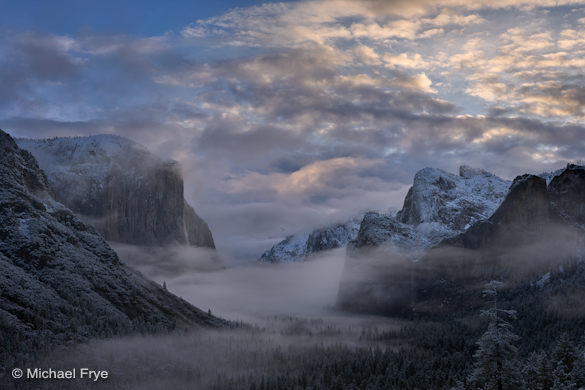
Winter sunrise from Tunnel View, February 7th, 2010
Update, Friday, January 7th:
This afternoon I counted the votes and listed the top ten images in another post. I still welcome hearing about your picks—they just won’t count toward picking the top ten. Thanks for your participation everyone!
As I mentioned in my last entry, Dan Mitchell had a great idea: he posted about 50 of his best photographs from 2010, and asked his blog readers to help him pick out the best ones. Dan has some beautiful work, and you can see the final results here.
I liked this idea so much I thought I would, uh, borrow it—with Dan’s permission of course. So I’ve set up a page with 46 of my best images from 2010, and I’m asking for help in picking out the top ten. After you look through them you can post a comment with your favorites. Once I’ve narrowed it down I’ll post the top ten on this blog, and submit the finalists to Jim Goldstein’s blog project, where once again he’ll be showcasing the ten best images of the year from over 100 photographers.
The judging for the my final ten will be more like Dancing With the Stars than America Idol. That means that unlike Idol, where only the viewer’s votes count, the judge—me—gets a say too, so if one of my favorites gets panned by everyone else I may still include it. But as one of my photographer friends, Clinton Smith, once said, we don’t get to pick our best images—the world does. So your votes will carry a lot of weight.
So have at it! And thanks for your participation—I really appreciate your taking the time to give me your thoughts about these photographs. Here’s the link to those 46 images again.
by Michael Frye | Dec 31, 2010 | Announcements
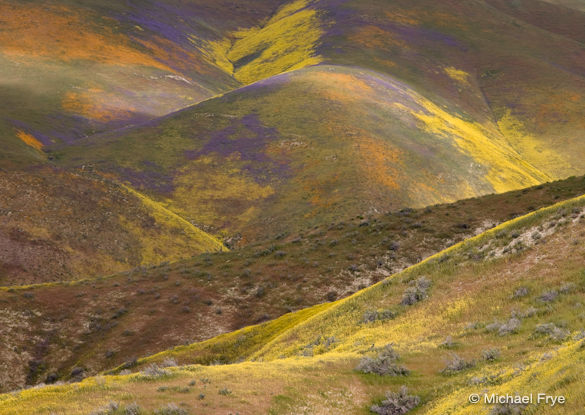
Wildflowers in the Temblor Range, April 3rd, 2010
Thanks to all of you for your participation in this blog during 2010. Your readership and comments have helped make this a great year. Your thoughts and insights about landscape photography have added great depth to whatever I’ve written here. I feel like I’ve made many new friends, and connected with lots of people who share a passion for landscape photography.
Among the regular commenters, three recently had work accepted into the Yosemite Renaissance XXVI exhibit: Robin Black, Brent Gilstrap, and David Hoffman. Congratulations! The exhibit opens February 25th at the Yosemite Museum Gallery. The opening reception is always a lot of fun, so I hope to see some of you there.
Another frequent contributor is fellow blogger G Dan Mitchell. Dan just did something really interesting. Attempting to pick out his best photos from 2010, he invited his readers to help him make the selections. He just posted the final results last night, and it’s a great collection of images.
Highlights From the Past Year
I thought it might be appropriate to look back at some of the highlights of the past year. This is not a comprehensive list by any means, so if your favorite post is missing, I apologize! These are just a few things that jumped out at me as I looked back through the posts from 2010.
Critiques
In January I did my first photo critique, of Tim Parkin’s photograph that he called “That Damned Loch.” The critiques have become very popular; you can find them all by clicking on the Critiques Category at the bottom of the right-hand sidebar. Meanwhile Tim has gone on to launch a new online magazine called Great British Landscapes. This looks like a great resource for any landscape photographer, British or otherwise, and I wish Tim much success with this venture.
Podcast Interview
Also in January, popular photo blogger Jim Goldstein recorded a podcast interview with me. Jim really has his pulse on the latest trends in the ever-changing world of digital photography, and I highly recommend reading his blog and following him on Twitter.
The One That Got Away
On March 1st I wrote a post about a fantastic sunset in Yosemite Valley that I missed. In April I critiqued a beautiful photograph by Sudheendra Kadri. Well it turns out that Sudhi also captured a fantastic image of that sunset from Tunnel View on that day when I decided (much to my regret) to stay home. Nice one Sudhi!
Temblor Range Wildflowers
In early April I photographed the most amazing wildflower display I’ve ever seen in southern California’s Temblor Range. I posted one photo on this blog, and more on my 25 Years in Yosemite blog.
First Video
June brought my first video tutorial, called The Power of Curves. Since then I’ve posted several more videos about the digital darkroom, and these have also become a popular feature on the blog. To see them all, scroll down to Categories at the bottom of the right-hand sidebar, and click on Video Tutorials.
Photographs That Inspire
One of the most popular and most re-tweeted posts from 2010 was called Photographs That Inspirefrom September 29th. This was a subject that I’d been thinking about for a long time, so it was great to see such a positive response—thanks!
What’s Ahead in 2011
I want to make this blog an even better resource for people who love landscape photography. I’m planning many new features in 2011, which I’ll announce… at the appropriate time. Stay tuned! And please invite your friends to join the conversation. The more ideas we share, the more we all learn.
Thanks again for helping to make 2010 a great year!
by Michael Frye | Dec 30, 2010 | Critiques
Light
This week’s photograph was made by Jeremy Long in Joshua Tree National Park, California. The image is an interesting study
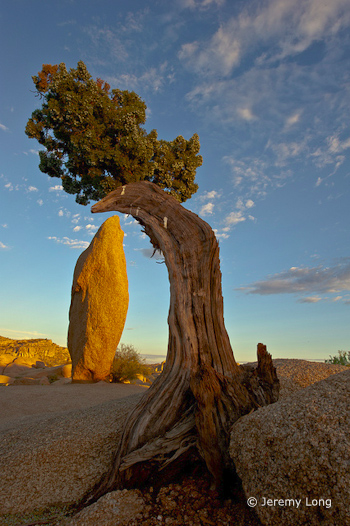
of both composition and light. Of course it’s impossible to separate the two, as one always affects the other, but when analyzing a photograph it helps to consider each aspect on its own.
Warm, early-morning sunlight rakes across the scene from right to left, highlighting the rock obelisk and making it look three-dimensional. Most of the foreground juniper remains in the shade; a rock formation probably blocked the sun from hitting the tree. Initially I thought it might be better to see sunlight striking the juniper as well, but the shade sets up a nice contrast with the lighter background, focusing attention on the shape of the tree rather than it’s color and texture, and that emphasis on shape works well here.
The clouds add a nice touch. While I wouldn’t call this spectacular light, it’s very good, and perfectly appropriate for the subject.
Composition
The main feature of this photograph is the juxtaposition between the arching tree and the rock obelisk. The fact that this idea comes through so clearly demonstrates how well Jeremy composed the image. The design is clean and simple, and the main elements stand out clearly, with little extraneous clutter.
There are only two small things I can nitpick about the composition. First, I’d like to see a little more breathing room between the top of the rock and the juniper. Although they don’t actually merge, they come close, and putting a bit more space between these two elements would help the main idea stand out more clearly, and make the whole photograph feel more balanced. Just lowering the camera position a few inches would have accomplished this.
Second, the two main elements are in the center and left of center, with mostly empty space to the right. Perhaps Jeremy was trying to show more of the clouds, but to me those clouds, while nice, don’t carry the same weight as the rock and tree, and the image would feel more balanced if the camera were pointed slightly more to the left.
Technical Considerations
Jeremy captured this image with a Nikon D700 and 14-24 mm lens at 24 mm. The shutter speed was 1/10 sec. at f/22 and 200 ISO.
That small aperture helped keep everything in focus, and the photograph looks quite sharp. The exposure also looks perfect, with detail in the clouds and all but the darkest shadows. The overall contrast looks about right.
This kind of situation presents a difficult white balance problem. If you watched my first white balance video you’ll remember that I usually recommend color temperatures around 5000K to 5500K—daylight—for images with sunlight, like this one. Setting a higher color temperature makes an image more amber or yellow, which enhances warm tones in objects lit by low-angle sunlight, like the rocks in this photograph. But warming the image also adds yellow to the blue sky, and blue and yellow are opposites. Push the color temperature high enough and the sky will turn gray. Raising it even a little will make the sky muddy.
Jeremy told me that he set the color temperature to 6686K. This warm color balance made the rocks look great, but the blue sky has lost some of its vibrance. So I took this image into Photoshop and used a Selective Color adjustment layer to subtract yellow from just the blues. This helped purify the sky color and restore some of it’s natural brilliance. I also subtracted cyan from the yellows, making the rock obelisk a bit warmer. The differences are subtle, so I’ve included a side-by-side comparison.
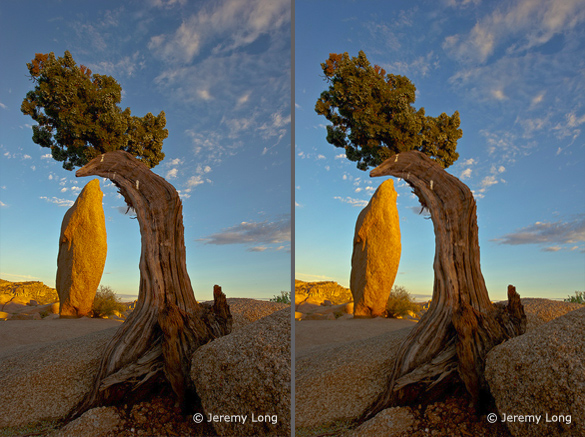
Left: the original image; Right: modified with Photoshop’s Selective Color tool
In my next, and last, video on white balance I’ll explain exactly how to use Photoshop’s Selective Color tool to get rich, warm tones on the landscape while keeping vivid blues in the sky.
Conclusions
This photograph has good light, a clean, simple composition, and is technically well executed. Overall it’s very well done.
What I’d say to Jeremy, and to anyone else who can compose and execute a photograph this well, is to try and take the next step, and make photographs that capture a mood, or somehow convey the feeling of what it was like to stand in a particular place at a particular time. The juxtaposition of the rock and tree in this photograph is interesting and eye-catching, but not particularly moving. And I know Jeremy is capable of capturing a great mood—here’s one example.
Your Comments
I’d love to hear your thoughts about this photograph. Do you agree that there should be more space between the tree and rock? What do you think about the sky color?
Thanks Jeremy for sharing your image! You can see more of his work on Flickr.
If you like these critiques, share them with a friend! Email this article, or click on one of the buttons below to post it on Facebook or Twitter.
As part of being chosen for this week’s critique Jeremy will receive a free 16×20 matted print courtesy of the folks at Aspen Creek Photo. If you’d like your images considered for future critiques, just upload them to the Flickr group I created for this purpose. If you’re not a Flickr member yet, joining is free and easy. You’ll have to read and accept the rules for the group before adding images, and please, no more than five photos per person per week. I’ll be posting the next critique in two weeks. Thanks for participating!